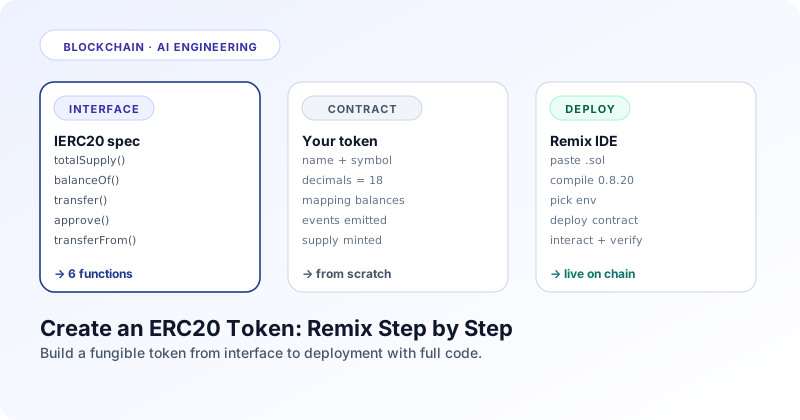
Section 01 · Definition
What is an ERC20 token, exactly?
ERC20 is a contract interface, not a contract itself. Anything that implements the six functions is an ERC20 token, no matter how the implementation looks underneath.
Quick answer
What is ERC20? ERC20 is a standard interface defined in EIP 20 for fungible tokens on Ethereum and EVM compatible chains. It specifies six functions and two events that every token contract must implement so that wallets, exchanges, and DeFi protocols can interact with any token using the same code path. USDC, DAI, UNI, LINK, and most stablecoins and project tokens are ERC20.
The word fungible means every unit is interchangeable. One USDC equals every other USDC. One UNI equals every other UNI. This is the opposite of an NFT, where each token has a unique identifier and is not interchangeable. ERC20 is the standard for the fungible category. ERC721 is the standard for non fungible tokens, and ERC1155 covers both in one contract.
ERC20 was proposed by Fabian Vogelsteller in late 2015 and accepted as Ethereum Improvement Proposal 20. Before ERC20, every token contract reinvented the wheel: different function names, different event signatures, different transfer semantics. Wallets could not list tokens consistently and exchanges had to hand integrate every new asset. The standard fixed that overnight. Once your contract follows the spec, every wallet and DEX in the ecosystem can talk to it.
ERC20 is an interface, not an implementation
The standard tells you which functions to expose and what they should return. It does not tell you how to store balances, how to mint supply, or whether to allow burning. Two ERC20 tokens can have completely different internal logic and still be ERC20 because they expose the same external surface. The interface is the contract; the rest is your design.
Section 02 · Interface
The complete ERC20 interface
Six required functions, two required events, three optional metadata functions everyone implements anyway. Here is the full surface.
The official interface, written exactly as the EIP defines it, looks like this:
// SPDX-License-Identifier: MIT
pragma solidity ^0.8.20;

interface IERC20 {
    // ── Required events ─────────────────────────────────────
    event Transfer(address indexed from, address indexed to, uint256 value);
    event Approval(address indexed owner, address indexed spender, uint256 value);

    // ── Required view functions ─────────────────────────────
    function totalSupply() external view returns (uint256);
    function balanceOf(address account) external view returns (uint256);
    function allowance(address owner, address spender) external view returns (uint256);

    // ── Required state changing functions ───────────────────
    function transfer(address to, uint256 amount) external returns (bool);
    function approve(address spender, uint256 amount) external returns (bool);
    function transferFrom(address from, address to, uint256 amount) external returns (bool);
}

interface IERC20Metadata is IERC20 {
    // ── Optional metadata (every real token implements these) ──
    function name() external view returns (string memory);
    function symbol() external view returns (string memory);
    function decimals() external view returns (uint8);
}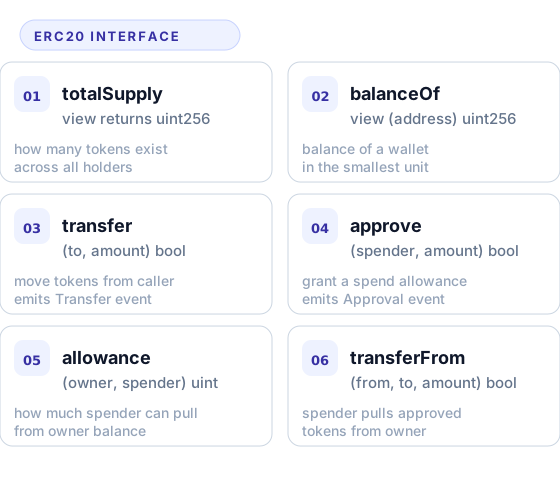
totalSupply()
Returns the total amount of tokens in existence right now. If your token has fixed supply, this never changes. If it has mint and burn, this rises and falls. Wallets show this in the token info panel.
balanceOf(account)
Returns how many tokens the given address holds, in the smallest unit. If decimals is 18 and balanceOf returns 1500000000000000000, that is 1.5 tokens. Always pure read, no gas when called from off chain.
transfer(to, amount)
Moves amount tokens from msg.sender to to. Returns true on success or reverts. Must emit a Transfer event with the from, to, and value. This is what your wallet calls when you send tokens directly.
approve(spender, amount)
Allows spender to later pull up to amount tokens from your balance through transferFrom. This is the foundation of every DEX and lending protocol: you approve the protocol contract first, then it pulls your tokens. Must emit an Approval event.
allowance(owner, spender)
Returns how many tokens spender is currently allowed to pull from owner. This is what front ends use to decide whether to ask the user for approval again or whether the previous one is still enough.
transferFrom(from, to, amount)
Pulls amount tokens from from and sends them to to. The caller must already have an allowance set up by from. Decrements the allowance and emits a Transfer event. This is how Uniswap, Aave, and friends actually move user funds.
Section 03 · Approve Pattern
The approve and transferFrom pattern
Half of every DEX swap, every lending deposit, every staking transaction goes through this pattern. Understand it once and the entire DeFi stack clicks.
Direct transfer is straightforward: you call token.transfer(recipient, amount) from your wallet and the tokens move. The complication comes when a smart contract needs to move your tokens. A DEX cannot just take your funds, it needs your permission. ERC20 solves this with a two step pattern: first you approve a spender, then the spender pulls.
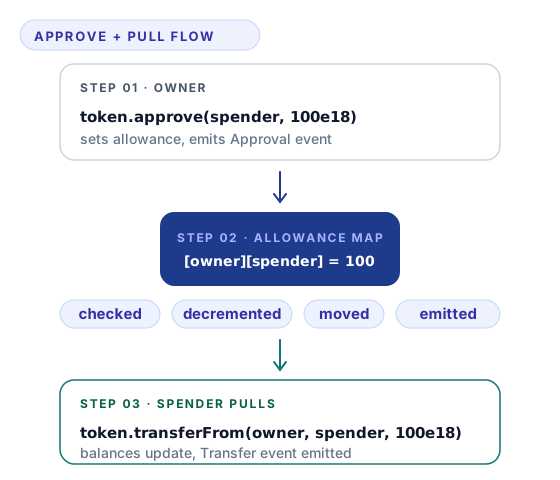
Step by step. You hold tokens. Some contract (a DEX router, a lending pool) wants to move them. You first call token.approve(routerAddress, 100e18) from your wallet. The token contract records that the router is allowed to pull up to 100 tokens (with 18 decimals) from your balance. Later, the router calls token.transferFrom(yourAddress, poolAddress, amount). The contract checks the allowance, decrements it, moves the tokens, and emits Transfer.
Infinite approvals are convenient and dangerous
Many wallets and DEXs default to approving the maximum uint256 value (2 raised to 256 minus 1) so the user never has to approve again. This is convenient but means a bug in the approved contract could drain the entire balance. For high value wallets, approve only the exact amount each time, or use revoke.cash to clean up old approvals.
Section 04 · Build Your Own
Write your own ERC20 from scratch
Importing OpenZeppelin is the production answer. Writing it yourself first is the educational answer. Here is the complete contract.
This is a working ERC20 implementation in roughly 80 lines. It implements every required function, the metadata extension, an owner controlled mint, and a public burn. Read it once top to bottom; every line earns its place.
// SPDX-License-Identifier: MIT
pragma solidity ^0.8.20;

contract MyToken {
    // ── Metadata ────────────────────────────────────────────
    string public name;
    string public symbol;
    uint8  public constant decimals = 18;

    // ── State ───────────────────────────────────────────────
    uint256 public totalSupply;
    address public owner;

    mapping(address => uint256)                      private _balances;
    mapping(address => mapping(address => uint256))  private _allowances;

    // ── Events ──────────────────────────────────────────────
    event Transfer(address indexed from, address indexed to, uint256 value);
    event Approval(address indexed owner, address indexed spender, uint256 value);

    // ── Custom errors (cheaper than revert strings) ─────────
    error NotOwner();
    error InsufficientBalance();
    error InsufficientAllowance();
    error TransferToZero();

    // ── Constructor ─────────────────────────────────────────
    constructor(string memory _name, string memory _symbol, uint256 _initialSupply) {
        name        = _name;
        symbol      = _symbol;
        owner       = msg.sender;
        _mint(msg.sender, _initialSupply);
    }

    // ── Read functions ──────────────────────────────────────
    function balanceOf(address account) external view returns (uint256) {
        return _balances[account];
    }

    function allowance(address holder, address spender) external view returns (uint256) {
        return _allowances[holder][spender];
    }

    // ── Transfer ────────────────────────────────────────────
    function transfer(address to, uint256 amount) external returns (bool) {
        _transfer(msg.sender, to, amount);
        return true;
    }

    // ── Approve / TransferFrom ──────────────────────────────
    function approve(address spender, uint256 amount) external returns (bool) {
        _allowances[msg.sender][spender] = amount;
        emit Approval(msg.sender, spender, amount);
        return true;
    }

    function transferFrom(address from, address to, uint256 amount) external returns (bool) {
        uint256 current = _allowances[from][msg.sender];
        if (current < amount) revert InsufficientAllowance();
        if (current != type(uint256).max) {
            _allowances[from][msg.sender] = current - amount;
        }
        _transfer(from, to, amount);
        return true;
    }

    // ── Mint / burn ─────────────────────────────────────────
    function mint(address to, uint256 amount) external {
        if (msg.sender != owner) revert NotOwner();
        _mint(to, amount);
    }

    function burn(uint256 amount) external {
        if (_balances[msg.sender] < amount) revert InsufficientBalance();
        _balances[msg.sender] -= amount;
        totalSupply           -= amount;
        emit Transfer(msg.sender, address(0), amount);
    }

    // ── Internal helpers ────────────────────────────────────
    function _transfer(address from, address to, uint256 amount) internal {
        if (to == address(0))             revert TransferToZero();
        if (_balances[from] < amount)     revert InsufficientBalance();
        _balances[from] -= amount;
        _balances[to]   += amount;
        emit Transfer(from, to, amount);
    }

    function _mint(address to, uint256 amount) internal {
        if (to == address(0)) revert TransferToZero();
        totalSupply     += amount;
        _balances[to]   += amount;
        emit Transfer(address(0), to, amount);
    }
}
A few patterns worth pointing out. Mint emits a Transfer from the zero address, and burn emits a Transfer to the zero address. This is how indexers and explorers detect supply changes without a separate event. The infinite approval check (type(uint256).max) skips the allowance decrement, which saves gas on common max approvals. Custom errors replace string reverts to save deploy and runtime gas.
For a production token, the safer path is to inherit OpenZeppelin's audited implementation. The same contract with OZ looks like this:
// SPDX-License-Identifier: MIT
pragma solidity ^0.8.20;

import "@openzeppelin/contracts/token/ERC20/ERC20.sol";
import "@openzeppelin/contracts/access/Ownable.sol";

contract MyToken is ERC20, Ownable {
    constructor(string memory name_, string memory symbol_, uint256 initialSupply)
        ERC20(name_, symbol_)
        Ownable(msg.sender)
    {
        _mint(msg.sender, initialSupply);
    }

    function mint(address to, uint256 amount) external onlyOwner {
        _mint(to, amount);
    }

    function burn(uint256 amount) external {
        _burn(msg.sender, amount);
    }
}
Twelve lines of your own code, plus an audited 200 lines from OpenZeppelin handling every edge case. This is what real production tokens look like.
Section 05 · Remix Deploy
Deploy on Remix IDE step by step
Remix runs the entire compile, deploy, and test loop in your browser. You can have your token live on a sandbox in two minutes.
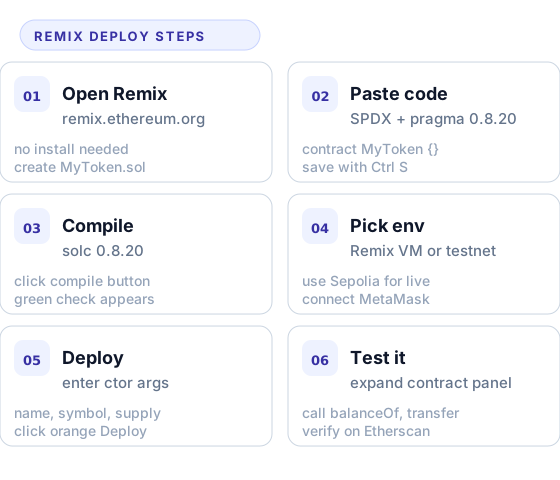
Open Remix and create the file
Visit remix.ethereum.org. In the File explorer panel, click the new file icon and name it MyToken.sol. The file extension matters; Solidity files must end in .sol for the compiler plugin to detect them.
Paste your contract code
Paste the from scratch contract from the previous section, or the OpenZeppelin variant if you prefer. Save with Ctrl S (Cmd S on Mac). Remix auto saves to browser storage so refreshing the page does not lose your work.
Compile with solc 0.8.20 or later
Switch to the Solidity Compiler tab on the left sidebar. Pick compiler version 0.8.20 or any 0.8 release. Click Compile MyToken.sol. A green checkmark appears next to the tab when the build succeeds. Errors show up in red with line numbers.
Pick a deployment environment
Switch to the Deploy and run transactions tab. The Environment dropdown offers Remix VM (sandbox), Injected Provider (your MetaMask wallet for real testnets), and a few hosted nodes. Use Remix VM for first tests; switch to Injected Provider with Sepolia selected in MetaMask for a real testnet deploy.
Enter constructor arguments and deploy
The Deploy section shows your constructor parameters. Enter the token name (e.g. "My Token"), symbol (e.g. "MTK"), and initial supply (e.g. 1000000000000000000000000 for one million tokens with 18 decimals). Click the orange Deploy button. The contract address appears under Deployed Contracts within seconds.
Test your token by calling its functions
Expand the deployed contract panel. Click totalSupply, balanceOf with your address, transfer to a different account, approve a second account, then have that account call transferFrom. Watch the events in the Remix terminal. Each successful call shows the gas used and the transaction hash.
Once your token works on Remix VM, the same flow deploys to Sepolia testnet. You will need test ETH from a Sepolia faucet (sepoliafaucet.com or Alchemy's faucet) to pay gas. After deployment to a real testnet, you can verify the contract source on Sepolia Etherscan, which makes the contract readable to the public and unlocks the Read and Write Contract tabs in the explorer interface.
Section 06 · Pitfalls
Common ERC20 mistakes to avoid
ERC20 looks simple but has well known sharp edges. These are the ones that have cost real users real funds.
Forgetting to multiply by 10^decimals
If decimals is 18 and you mint 1000 in the constructor, you actually minted 0.000000000000001 tokens. Always multiply by 10 to the power decimals when specifying amounts. The convention is to write 1_000_000 * 10**18 or 1_000_000 ether (which expands to the same value).
Sending tokens to the contract address
Users sometimes send tokens to a token contract by mistake (the contract holds itself). Without a recovery function those tokens are stuck forever. Either implement an owner only recoverERC20 sweep or document this clearly.
Approval race condition
Changing allowance from non zero to non zero in two transactions is unsafe; a malicious spender can frontrun and use both old and new allowance. The convention is to set allowance to zero first and then to the new amount, or use the increaseAllowance and decreaseAllowance OpenZeppelin extensions.
Missing return values
Some old token contracts (USDT being the famous one) do not return a bool from transfer or approve. Code that calls token.transfer(...) and expects a boolean will revert when interacting with these tokens. Use SafeERC20 from OpenZeppelin if you need to support legacy tokens.
The from scratch contract above sidesteps these by using uint256 max as the infinite allowance check, by reverting on transfers to the zero address, and by always returning true from state changing functions. The OpenZeppelin version has every guard already baked in.