Section 01 · What you build
What is a Solidity calculator contract?
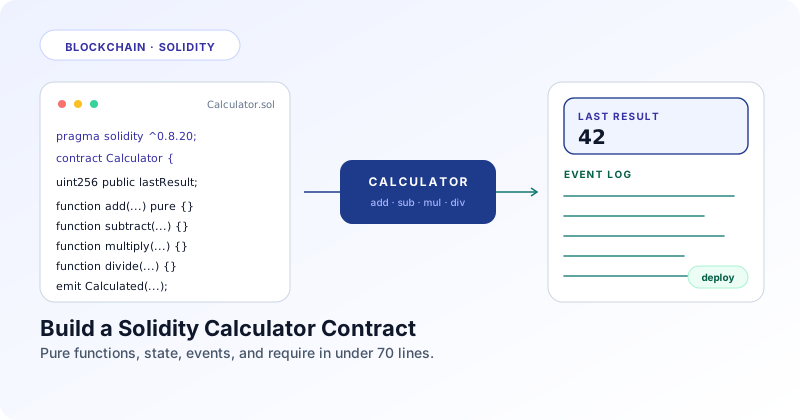
A calculator contract is the smart contract version of the program every language teaches first. It exposes add, subtract, multiply, and divide on chain, stores the most recent result, and emits an event whenever the result changes. Small enough to read in one sitting, complete enough to use every core Solidity concept.
Quick answer
In one sentence: A Solidity calculator contract is a small contract that performs the four basic arithmetic operations on uint256 values, stores the latest result in state, and emits an event whenever a write happens, giving you a complete tour of pragma, state variables, function visibility, view vs pure, require checks, and events.
If you have written JavaScript, Python, or Java, the mental model carries over almost directly. A contract is a class. State variables are fields on that class. Functions are methods. The two new ideas are that some methods cost money to call because they change state, and others are free because they only do math. By the end of this tutorial you will know which is which and why.
Section 02 · Stage one
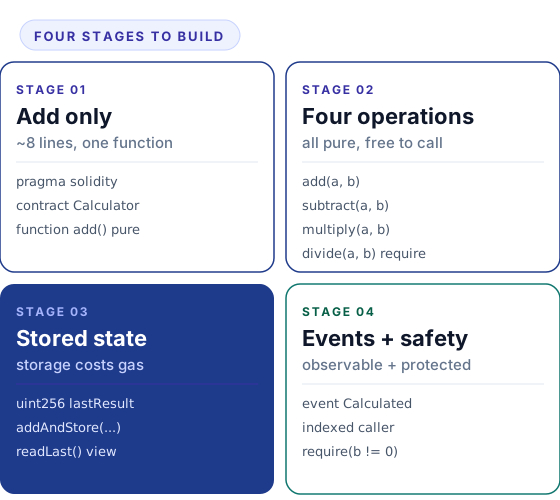
The smallest working contract: one add function
Start with the bare minimum that compiles, deploys, and answers a single question. Every line in the snippet below earns its place.
// SPDX-License-Identifier: MIT
pragma solidity ^0.8.20;

contract Calculator {
    function add(uint256 a, uint256 b) external pure returns (uint256) {
        return a + b;
    }
}
Five things are happening here. The SPDX-License-Identifier comment is required by every Solidity file and tells tooling how the source can be reused. The pragma line pins the compiler version to anything in the 0.8 family, which is the version that turned on automatic overflow protection. The contract keyword is the equivalent of class in most languages. The function signature declares two inputs of type uint256. The two new keywords are external and pure.
external means the function can be called from outside the contract but not from another function inside the same contract directly. pure tells the compiler that this function neither reads nor writes any state. Both flags are safety nets. If you accidentally read a state variable later, the compiler will refuse to build, which is exactly what you want for a math helper.
Why uint256 and not just int
Solidity defaults to 256 bit integers because the EVM word size is 256 bits. Using a smaller type like uint8 saves no gas on its own and only matters when you pack multiple small values into one storage slot. For a top level function parameter, always reach for uint256 first.
Section 03 · Stage two
All four operations as pure functions
The other three operations follow the same shape. Subtract, multiply, and divide each take two inputs, return one output, and touch no state. Keeping them pure is the right default until you have a reason to do otherwise.
// SPDX-License-Identifier: MIT
pragma solidity ^0.8.20;

contract Calculator {
    function add(uint256 a, uint256 b) external pure returns (uint256) {
        return a + b;
    }

    function subtract(uint256 a, uint256 b) external pure returns (uint256) {
        return a - b;
    }

    function multiply(uint256 a, uint256 b) external pure returns (uint256) {
        return a * b;
    }

    function divide(uint256 a, uint256 b) external pure returns (uint256) {
        require(b != 0, "Calculator: divide by zero");
        return a / b;
    }
}
Three of the four functions are line for line identical except for the operator. Divide is the one that needs an explicit guard. The require statement reverts the transaction with the given message if the condition fails. Without it you would still get a revert from the EVM, but the error message would be a generic Panic(0x12) instead of the human readable string you provided.
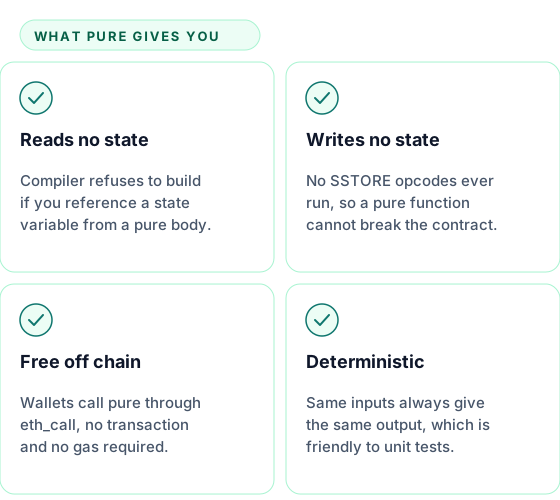
Calling any of these from a wallet via eth_call costs zero gas because no transaction is created. The EVM runs the function locally on the node and returns the answer. That is the whole point of marking a function pure when it qualifies.
Section 04 · Stage three
Save the last result in state
A calculator that forgets every answer the moment the call ends is fine for a math helper, but most teaching examples want you to see the difference between a free read and a paid write. Add one state variable and one writing function.
// SPDX-License-Identifier: MIT
pragma solidity ^0.8.20;

contract Calculator {
    // State variable. Lives in storage. Persists across transactions.
    uint256 public lastResult;

    // Writes state, so it can no longer be pure. It is not even view.
    function addAndStore(uint256 a, uint256 b) external returns (uint256) {
        lastResult = a + b;
        return lastResult;
    }

    // Reads state but does not write. view is the right keyword.
    function readLast() external view returns (uint256) {
        return lastResult;
    }
}
Three things changed. There is a state variable named lastResult. The public keyword in front of it tells the compiler to auto generate a getter, which is why a separate readLast function is technically redundant in production but useful here for teaching the difference between view and the auto getter. The new addAndStore function does not have pure or view because it writes state.
| Keyword | Reads state | Writes state | Costs gas to call |
|---|---|---|---|
| pure | no | no | no |
| view | yes | no | no |
| (none) — default | yes | yes | yes |
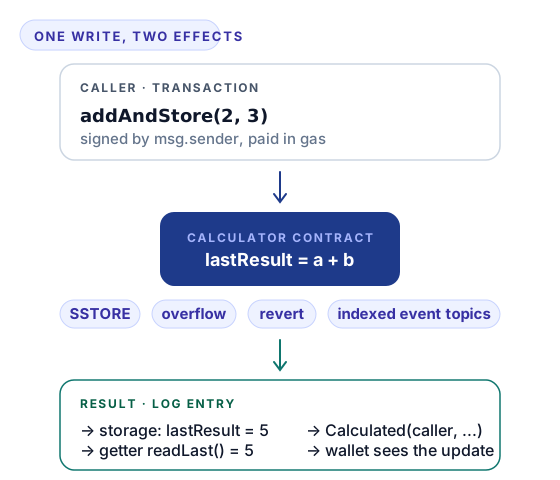
The third row is the one that surprises people coming from regular programming. Calling addAndStore from MetaMask requires a real transaction, which means signing, broadcasting, waiting for inclusion, and paying gas. Calling either readLast or the auto getter for lastResult is free because no state changes.
Section 05 · Stage four
Events make the writes observable off chain
A wallet, a frontend, or an off chain indexer cannot poll storage cheaply. The standard answer is to emit an event whenever something interesting happens, then let off chain code subscribe to those events through the node's log stream.
// SPDX-License-Identifier: MIT
pragma solidity ^0.8.20;

contract Calculator {
    uint256 public lastResult;

    // Indexed parameters become topics that off chain filters can match.
    event Calculated(
        address indexed caller,
        string operation,
        uint256 a,
        uint256 b,
        uint256 result
    );

    function addAndStore(uint256 a, uint256 b) external returns (uint256) {
        lastResult = a + b;
        emit Calculated(msg.sender, "add", a, b, lastResult);
        return lastResult;
    }
}
The event declaration says what a Calculated log entry looks like. Marking caller as indexed tells the EVM to store it as a separate topic, which lets the frontend filter for “every Calculated event where the caller is this address” without scanning and decoding every log byte. Up to three indexed parameters per event are allowed.
Why a token shows up in your wallet
Wallets do not poll contract storage. They watch the log stream for events that match standardised signatures. ERC20 tokens emit Transfer when balances change, which is what triggers the wallet to refresh its display. Drop the event from your contract and the same balance change happens, but no wallet on earth will notice. Calculator events are toy versions of the same idea.
Section 06 · The full contract
Putting all four stages together
Here is the complete Calculator. Roughly 70 lines, every operation present, every operation logged, every divide by zero guarded, and a single state variable for the last result.
// SPDX-License-Identifier: MIT
pragma solidity ^0.8.20;

/// @title Calculator
/// @notice A teaching contract that exposes the four basic arithmetic
///         operations on uint256, stores the latest result, and emits an
///         event for every write so off chain consumers can react.
contract Calculator {
    // ── State ────────────────────────────────────────────────────────
    uint256 public lastResult;

    // ── Events ───────────────────────────────────────────────────────
    event Calculated(
        address indexed caller,
        string operation,
        uint256 a,
        uint256 b,
        uint256 result
    );

    // ── Pure helpers (free to call off chain) ────────────────────────

    function add(uint256 a, uint256 b) external pure returns (uint256) {
        return a + b;
    }

    function subtract(uint256 a, uint256 b) external pure returns (uint256) {
        return a - b;
    }

    function multiply(uint256 a, uint256 b) external pure returns (uint256) {
        return a * b;
    }

    function divide(uint256 a, uint256 b) external pure returns (uint256) {
        require(b != 0, "Calculator: divide by zero");
        return a / b;
    }

    // ── State writing operations (each one costs gas) ────────────────

    function addAndStore(uint256 a, uint256 b) external returns (uint256) {
        lastResult = a + b;
        emit Calculated(msg.sender, "add", a, b, lastResult);
        return lastResult;
    }

    function subtractAndStore(uint256 a, uint256 b) external returns (uint256) {
        lastResult = a - b;
        emit Calculated(msg.sender, "sub", a, b, lastResult);
        return lastResult;
    }

    function multiplyAndStore(uint256 a, uint256 b) external returns (uint256) {
        lastResult = a * b;
        emit Calculated(msg.sender, "mul", a, b, lastResult);
        return lastResult;
    }

    function divideAndStore(uint256 a, uint256 b) external returns (uint256) {
        require(b != 0, "Calculator: divide by zero");
        lastResult = a / b;
        emit Calculated(msg.sender, "div", a, b, lastResult);
        return lastResult;
    }

    // Reset the stored result back to zero.
    function reset() external {
        lastResult = 0;
        emit Calculated(msg.sender, "reset", 0, 0, 0);
    }
}
Each operation now exists in two forms: a pure helper that costs nothing and returns the answer, and a state writing version that costs gas, updates lastResult, and emits an event. Real contracts almost never duplicate logic like this, but seeing both side by side is the fastest way to feel the gas difference. In a production version you would keep only the shape that matches your use case.
Section 07 · Deploy in Remix
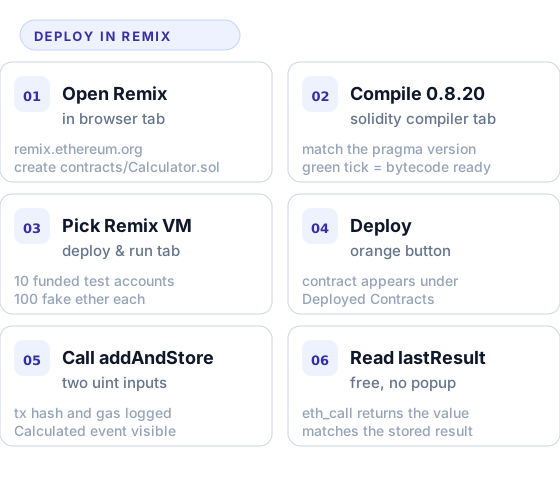
Six steps to deploy and call your first transaction
Remix is the quickest path from source code to a deployed contract. You do not install anything and you do not need a real wallet to start.
Open Remix and create the file
Visit remix.ethereum.org. In the file explorer create contracts/Calculator.sol and paste the full contract above. Remix recognises the .sol extension automatically.
Compile with the matching version
Open the Solidity Compiler tab on the left. Pick a 0.8.20 or newer compiler. Click Compile Calculator.sol. A green tick means the bytecode is ready.
Switch to the Remix VM environment
Open the Deploy and Run Transactions tab. Set the Environment dropdown to Remix VM (Cancun) or whichever sandbox version is current. This gives you ten test accounts each preloaded with 100 fake ether.
Deploy the contract
With Calculator selected in the Contract dropdown, click the orange Deploy button. The deployed instance appears under Deployed Contracts with every public function expanded as a button.
Call addAndStore and watch the gas
Type two numbers into the addAndStore inputs and click the orange button. The console logs the transaction hash, gas used, and the emitted Calculated event. Click the event to expand the indexed caller, the operation string, and the result.
Read lastResult for free
Click the blue lastResult button or call readLast. No wallet popup appears because the call is a free eth_call. The returned value matches the result you just stored.
Section 08 · Where to go next
From beginner contract to intermediate patterns
The calculator is intentionally small. The same skeleton hosts every concept you meet in the next layer of Solidity. Three natural extensions are worth attempting once you have the base contract running.
| Extension | What you add | Concept it teaches |
|---|---|---|
| Owner only resets | An onlyOwner modifier and an immutable owner address | Modifiers and access control |
| History of calculations | A struct plus an array that records every write | Structs, arrays, and storage layout |
| Custom errors instead of strings | error DivideByZero(); replacing the require message | Gas efficient revert reasons in 0.8.4 and later |
Pick one and try it before reading further. The order does not matter, but adding access control first is the most useful because almost every real contract needs it. The full pattern is covered in depth in modifiers in Solidity, and the broader language overview lives in the Solidity smart contracts beginner guide. If you want to dig into the mechanics behind the function flavours used here, see function visibility in Solidity. The events you just emitted are explored in detail in events in Solidity.