Section 01 · Definition
What is a string array in Solidity?
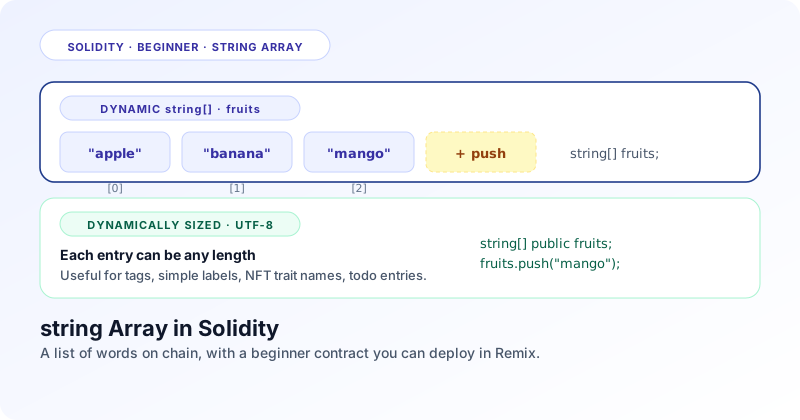
A string array is a list of words. Each entry holds a piece of text, each piece sits at a numbered position, and the list can grow as your contract receives more entries.
Quick answer
What is a string array? A string array is an ordered list where every entry is a UTF-8 string. The type is written string[]. You add a word with push, read one by index, and count the items with length. Unlike numeric arrays, string entries can be any length, which is why every string in Solidity needs a memory or storage location label when used outside of state.
The keyword string is Solidity's built in type for text. Underneath, a string is just a sequence of UTF-8 bytes, but the language hides that detail when you read and write through it. Add square brackets and you turn it into an array of strings, which is the structure this post is about.
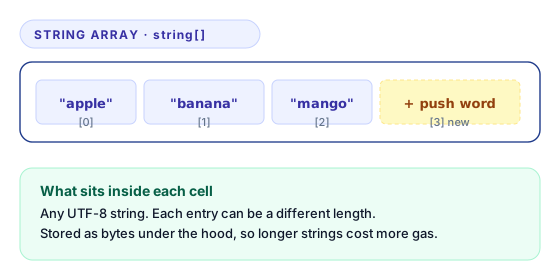
The mental model is again a row of boxes, but the boxes can be different widths because each word is its own length. The index still starts at zero. The length still grows by one on each push. The new rule for beginners is the data location keyword you must attach when a string moves between functions.
Section 02 · Real use case
A simple real world example
A market contract that records the names of fruits on sale today. Each entry is a short word like apple or mango. The list grows when a new fruit arrives and stays small enough to keep on chain.
The contract needs three operations. Add a fruit name. Read the name at any position. Know how many fruits are on sale today. A string array does all three with the smallest possible code surface.
Other places this same shape shows up: a todo contract that records short task descriptions, an NFT contract that exposes a list of rarity tag names, or a contest contract that keeps a list of contestant nicknames. Numbers will not work for these because the data is text by nature.
Section 03 · Smart contract
A complete string array smart contract
A small FruitBasket contract with one storage array and four functions. Short enough to read in two minutes, complete enough to deploy in Remix.
// SPDX-License-Identifier: MIT
pragma solidity ^0.8.20;

contract FruitBasket {
    // 1. The storage array. Holds words on chain.
    string[] public fruits;

    // 2. Append a fruit name to the end of the list.
    function addFruit(string memory name) external {
        fruits.push(name);
    }

    // 3. Read a fruit at a specific index.
    function getFruit(uint256 i) external view returns (string memory) {
        require(i < fruits.length, "index out of range");
        return fruits[i];
    }

    // 4. Return how many fruits are stored right now.
    function totalFruits() external view returns (uint256) {
        return fruits.length;
    }
}
Paste the contract into Remix, compile with the 0.8.20 compiler, and deploy to the JavaScript VM. In the deploy panel call addFruit with values like "apple" and "mango". The double quotes are required because the string literal is text, not an identifier.
Section 04 · Line by line
What every important line does
Walk through the contract one block at a time. Most lines mirror the uint and int posts, with two extra rules that come from the string type.
string[] public fruits;The type string[] declares a dynamic array of UTF-8 strings. Solidity stores the data in storage slots that grow as the array grows. The keyword public generates a getter that returns one fruit at a time, not the whole array.
function addFruit(string memory name) external {
    fruits.push(name);
}
Notice the memory keyword on the parameter. Strings are reference types, so Solidity needs to know where the data lives. memory means the value lives in a temporary scratch area for this call only. The line then copies the string into the storage array with push.
function getFruit(uint256 i) external view returns (string memory) {
    require(i < fruits.length, "index out of range");
    return fruits[i];
}
The return type is string memory, again because Solidity needs the location label. The function copies the storage string into a fresh memory string for the return trip. The require guard reverts on out of range indexes before the lookup runs.
function totalFruits() external view returns (uint256) {
    return fruits.length;
}
The length is a plain uint256 regardless of the array element type. There is nothing string specific in this function.
Section 05 · Reading and writing
Add data, get data, count items
The three operations look the same as the numeric arrays. The new wrinkle is the memory keyword that follows the string type wherever it goes.
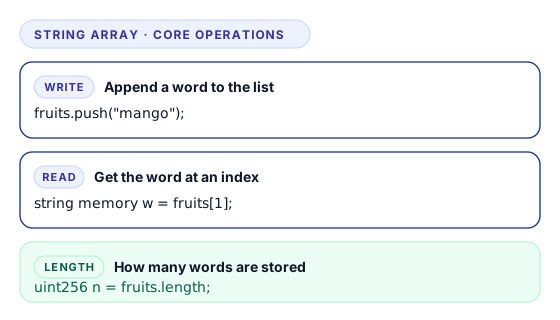
Adding data uses fruits.push("mango"). The double quotes turn the bare word into a string literal. Solidity copies the literal into storage and grows the array.
Reading data uses bracket lookup, but the variable that holds the result needs a location label. Inside another function you would write string memory w = fruits[1]. The left side of the assignment is a memory string because it lives only for this call.
Counting items uses fruits.length. No new rules apply here. The result is a plain unsigned integer.
Section 06 · Methods
Add the array methods to FruitBasket, one function at a time
The FruitBasket contract from Section 03 only has push, indexed read, and length. Here are four more methods every beginner should know, added one function at a time so you can paste each into the same contract and try it in Remix as you go.
Start with the FruitBasket contract you already have. Each function below goes right after the existing ones inside the contract body. None of them needs a for loop. Every string input still uses memory so the compiler knows where the data lives.
Function 1. Remove the last fruit with pop
function dropLast() external {
    require(fruits.length > 0, "empty");
    fruits.pop();
}
fruits.pop() drops the last word and shrinks the length by one. The require guard is critical: calling pop on a zero length array triggers a panic and the transaction reverts. Add the guard whenever the array can be empty at call time.
Function 2. Reset one slot with delete by index
function clearFruit(uint256 i) external {
    require(i < fruits.length, "out of range");
    delete fruits[i];
}
delete fruits[i] writes the type default into the targeted slot. For a string the default is the empty string "", not a null value. The call sets that entry to a zero length string without changing the array length. If empty strings are not meaningful in your domain, treat them as tombstones or compact the array with swap and pop in the next section.
Function 3. Wipe the entire array with delete on the variable
function clearBasket() external {
    delete fruits;
}
delete fruits on the whole array resets every slot to the empty string and sets the length back to zero in one line. After the call, every indexed read goes out of range, and the next push starts a fresh basket from index zero.
Function 4. Overwrite a fruit with direct assignment
function updateFruit(uint256 i, string memory name) external {
    require(i < fruits.length, "out of range");
    fruits[i] = name;
}
Bracket assignment writes a new string into the slot at the given index. The bounds check stops the call early when the index is past the end. Storage to storage string assignments copy the underlying bytes, so longer words cost more gas. The length of the array does not change because the slot already existed.
After adding the four functions, your FruitBasket contract now covers all five basic array operations: push, pop, delete by index, delete on the variable, and bracket assignment. Compile in Remix, redeploy, and try each new function from the deploy panel with both short and longer words.
No equality with double equals
Solidity does not let you compare two strings with == or !=. To check if two strings are equal you compare their hashes with keccak256(bytes(a)) == keccak256(bytes(b)). The same trick works on bytes values. It is the standard idiom and works on any UTF-8 input.
Section 07 · Removal
Function 5. Remove any word with swap and pop
When you need to drop a word from the middle of a string array and you do not care about preserving the order, the swap and pop pattern removes it in constant time. Two writes and a pop, no iteration.
Move the last word into the slot you want to drop, then call pop. The targeted entry disappears, the last entry takes its place, and the length shrinks by one. The remaining entries stay valid strings, but their order is no longer the order they were pushed in.
function removeAt(uint256 i) external {
    uint256 last = fruits.length - 1;
    require(i <= last, "out of range");

    if (i != last) {
        fruits[i] = fruits[last];
    }
    fruits.pop();
}
A string assignment in storage copies the underlying bytes, so the line fruits[i] = fruits[last] is more expensive than the same line on a uint array. The cost scales with the length of the word being moved, which is one more reason to keep entries short.
Section 08 · More patterns
Return the whole array, build memory string arrays, declare fixed length
Three more patterns added one at a time. The first goes onto FruitBasket as Function 6. The other two are reference patterns you will reuse in other contracts.
Function 6. Return the whole array as one value
Returning the whole array works when the list is small. The return type uses the memory location keyword because the caller receives a fresh copy of every entry, not a pointer into storage. Solidity has to copy each string out of storage, so this call grows expensive as the array grows. Add this function next to the rest in FruitBasket.
function allFruits() external view returns (string[] memory) {
    return fruits;
}
Pattern 1. Build a temporary memory array
Memory arrays let you build a temporary word list inside a function. The size is fixed at the moment you create them with new, so you cannot push or pop on a memory array. Set the entries by index after creation, and remember that each value uses the memory location too. This pattern lives on its own; it does not extend FruitBasket because the function is pure.
function buildShortlist() external pure returns (string[] memory) {
    string[] memory shortlist = new string[](3);
    shortlist[0] = "apple";
    shortlist[1] = "banana";
    shortlist[2] = "mango";
    return shortlist;
}
Pattern 2. Declare a fixed length storage array
Fixed length storage string arrays declare the slot count inside the brackets. You cannot push or pop because the size never changes. Every slot starts as the empty string and you write into the slots by index. This is a separate state variable on its own contract, not an extension of the dynamic FruitBasket array.
// Three slot string array baked into storage.
string[3] public featured;

function setFeatured(uint256 i, string memory name) external {
    require(i < 3, "out of range");
    featured[i] = name;
}
You cannot resize a dynamic string array by writing to length
In Solidity 0.5 you could shrink an array with fruits.length = newLen. That assignment was removed in 0.6 and the modern compiler rejects it. Grow with push. Shrink with pop or delete. Reset fully with delete fruits. The length property is read only in every current Solidity version.
Section 09 · Final contract
The complete FruitBasket with all six methods together
The original FruitBasket from Section 03 plus the six methods you have added function by function. One paste ready file you can drop into Remix and try every operation in a single session, with every string input still labelled memory.
The contract below is the full version. The first three functions are the originals: push wrapped as addFruit, indexed read wrapped as getFruit, and the length read wrapped as totalFruits. The remaining six are the additions you walked through in Sections 06 to 08. Notice that every string parameter still carries the memory location keyword.
// SPDX-License-Identifier: MIT
pragma solidity ^0.8.20;

contract FruitBasket {
    string[] public fruits;

    // Append a fruit name to the end of the list.
    function addFruit(string memory name) external {
        fruits.push(name);
    }

    // Read a fruit at a specific index.
    function getFruit(uint256 i) external view returns (string memory) {
        require(i < fruits.length, "out of range");
        return fruits[i];
    }

    // Return how many fruits are stored right now.
    function totalFruits() external view returns (uint256) {
        return fruits.length;
    }

    // Function 1. Remove the most recent fruit with pop.
    function dropLast() external {
        require(fruits.length > 0, "empty");
        fruits.pop();
    }

    // Function 2. Reset one slot to the empty string with delete by index.
    function clearFruit(uint256 i) external {
        require(i < fruits.length, "out of range");
        delete fruits[i];
    }

    // Function 3. Wipe the whole basket with delete on the variable.
    function clearBasket() external {
        delete fruits;
    }

    // Function 4. Overwrite a fruit with direct assignment.
    function updateFruit(uint256 i, string memory name) external {
        require(i < fruits.length, "out of range");
        fruits[i] = name;
    }

    // Function 5. Remove any fruit with swap and pop.
    function removeAt(uint256 i) external {
        uint256 last = fruits.length - 1;
        require(i <= last, "out of range");
        if (i != last) {
            fruits[i] = fruits[last];
        }
        fruits.pop();
    }

    // Function 6. Return the whole array as memory.
    function allFruits() external view returns (string[] memory) {
        return fruits;
    }
}
Open Remix, paste the contract, compile with the 0.8.20 compiler, and redeploy to the JavaScript VM. The deploy panel now lists nine callable buttons. Push three words with addFruit, call allFruits to see them in order, run removeAt(0) and notice the order changes because swap and pop is unordered. Every method you have learnt in this post lives in this single file.
Section 10 · Beginner mistakes
Five mistakes new Solidity developers make with string arrays
Forgetting the memory keyword
A function that takes or returns a string without a location keyword fails to compile. Always write string memory for inputs, outputs, and local variables. Storage arrays do not need the label because storage is implicit on state.
Trying to compare strings with ==
Solidity rejects string equality with double equals. Hash both sides with keccak256(bytes(value)) and compare the bytes32 results instead. This is the standard idiom and it works on any UTF-8 input.
Storing long sentences on chain
Each character costs gas. A short word like apple is fine. A paragraph is not. Keep on chain text short. Push longer descriptions to IPFS and store the resulting hash on chain instead.
Confusing string with bytes
string is meant for human readable text. bytes is meant for arbitrary byte data. Use string for names and labels. Use bytes when you store an ABI encoded payload or a Merkle proof input.
Iterating a user editable list of strings
If users can call addFruit freely and another function loops over the whole array, the loop can run out of gas as the list grows. For a beginner contract this is fine. In production prefer pull patterns or pagination.
Section 11 · Practice task
Try this on your own
A small extension that locks in push, pop, delete, swap and pop, and bracket assignment on a string array. Try to ship it without copying from the contract above.
Build a TodoList contract
Add a string[] tasks array and six external functions. addTask(string memory text) appends a new entry. getTask(uint256 i) returns the entry with a bounds check. taskCount() returns the length. clearLast() removes the most recent task with pop and a length guard. clearTask(uint256 i) resets one slot with delete by index. removeAt(uint256 i) removes any task with swap and pop. editTask(uint256 i, string memory text) overwrites an existing entry. Bonus: add allTasks() returning string[] memory so a UI can render the whole list in one call.
Deploy the contract in Remix, push three short tasks, and verify the length is three. Then call clearLast() once and confirm the length drops to two. Try removeAt(0) next and observe that the order of the remaining task changes because swap and pop is unordered. If any call fails, check that you wrote memory on every input and return type that touches a string.