Quick answer
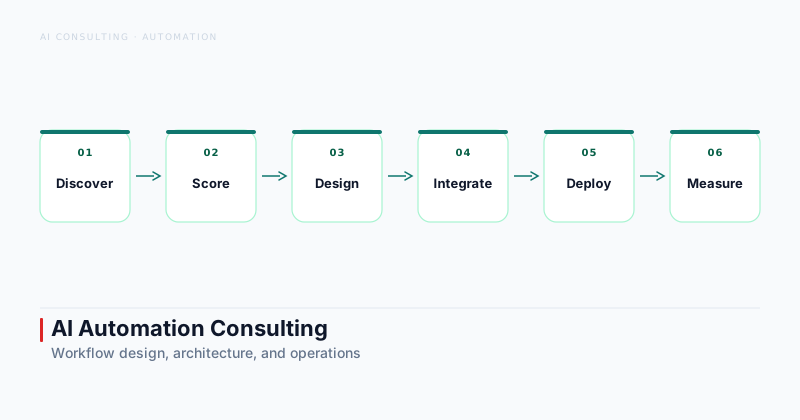
What is AI automation consulting? AI automation consulting helps organizations identify which workflows are worth automating, redesign them for AI assisted execution, connect the required systems, and define controls for exceptions, approvals, and monitoring. Strong engagements start with process and ROI analysis rather than tools, then move through architecture, pilot delivery, and production rollout.
Most companies approach automation by picking a tool first. They evaluate vendors, run a pilot on whatever workflow is closest to the demo, and then wonder why the automation adds overhead rather than removing it. AI automation consulting works differently: it treats process design and exception handling as the primary deliverables, with tools selected to serve a well defined architecture.
This distinction matters more than it sounds. Automation built on top of a poorly understood process inherits every ambiguity in that process. The model does not know what to do when a customer submits an incomplete form. The workflow does not know who owns the output when confidence is low. The monitoring dashboard shows “succeeded” because no exception was thrown, even though the wrong data landed in the CRM. These are not tool problems — they are design problems that no vendor demo will surface.
Section 01 · What it Does
What AI automation consulting actually does
Three phases — discovery, architecture and build, and operations — each with deliverables that outlast the engagement.
AI automation consulting is the discipline of applying AI to business workflows in a way that improves operations without introducing fragile automation that requires more management than the manual process it replaced.
The engagement typically runs in three phases. The first is discovery: cataloguing workflows that are repetitive or high volume, scoring them by value and risk, and selecting the two or three candidates with the best ratio of impact to integration complexity. HSO defines this as identifying, designing, and deploying intelligent automation solutions that handle complex business processes end to end — with the emphasis on design preceding deployment.
The second phase is architecture and build: designing the AI steps, the human approval points, the exception handling, the system integrations, and the monitoring. The third is operations: defining who owns failures, how drift is detected, and how the workflow changes when models, vendors, or business rules change.
From manual process to intelligent workflow
A workflow that moves from manual to automated does not just speed up — it changes shape. Tasks that a person handles through judgment and context are now handled by a model operating on structured inputs. That means every implicit rule in the manual process needs to be made explicit: what data is required before the task starts, what outputs are acceptable, what happens when the confidence score is low, and who reviews edge cases.
A useful framing: write the SOP first. If you cannot write a clear SOP for the workflow, you are not ready to automate it.
Why process design comes before tools
The order of operations matters. An automation consultant who starts with a platform demo is optimizing for what the platform does well, not for what the business actually needs. Agentix Labs recommends inventorying repeated workflows, scoring opportunities by value and risk, designing architecture with approvals and fallback paths, then piloting and measuring impact — in that order.
This sequence is not just methodology. It prevents the most common automation failure mode: a workflow that functions as designed but does not deliver the ROI that justified the investment.
Section 02 · Discovery
Find the right workflows to automate
Score by value, risk, and integration complexity before committing to any build.
Not all automation candidates are equal. The workflows that deliver the highest return share a set of structural properties: repeated inputs, clear success criteria, measurable cycle time or cost, and enough definition to specify what counts as an exception.
Inventory repetitive work and handoffs
Start by listing every workflow where a person performs the same sequence of steps more than ten times a week. Then add handoffs — steps where information moves from one system, person, or team to another. Handoffs are often where delays and errors accumulate, and they are frequently strong automation candidates because the transfer logic is bounded.
Good candidates include document processing, routing and triage, lead qualification, report generation, and back office operations with structured inputs. Decisions that require judgment without clear criteria, customer interactions that demand nuanced context, and processes where the inputs are too variable to define reliable handling rules are weak candidates.
Score value, risk, and integration effort
Score each candidate on three dimensions: value (cycle time saved, cost reduced, error rate lowered), risk (what happens if the automation produces the wrong output), and integration effort (how many systems the workflow touches and how clearly documented their APIs are).
The top candidates are high value, low risk, and low integration complexity. Start there. Avoid the temptation to automate the largest or most visible workflow first — complexity that is hard to manage manually is usually harder to manage in automation.
Section 03 · Architecture
Design the automation architecture
Specify AI steps, approval points, exception paths, and logs before writing a single line of code.
The architecture for an AI automation workflow specifies the AI steps, the data inputs, the human approval points, the exception handling, and the monitoring. SynkrAI emphasizes process mapping, ROI targets, SOP design, stack selection, and monitoring after launch as prerequisites before any automation is built.
Agents, APIs, approvals, and logs
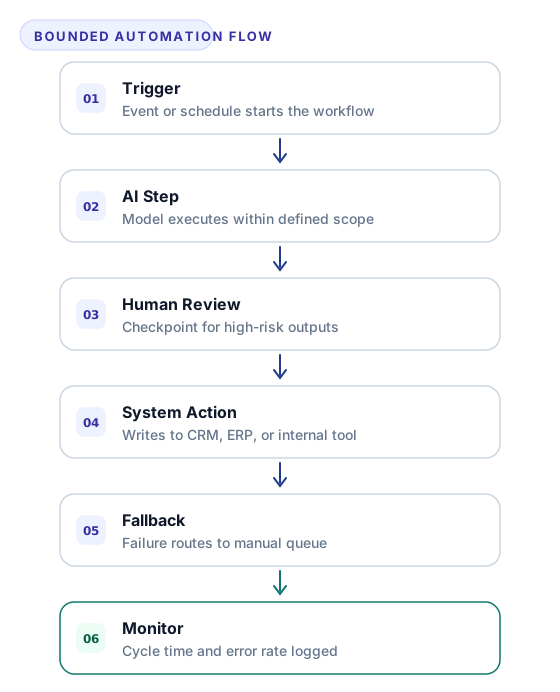
A properly designed automation is not a single AI call — it is a sequence of bounded steps connected by conditional logic. Each AI step receives defined inputs, produces defined outputs, and hands control either to the next step, to a human reviewer, or to an exception handler.
Every step should produce a log entry: inputs received, output produced, decision made, and timestamp. This is not optional — when the workflow fails months after launch, the audit trail is what distinguishes a fixable bug from an unfixable mystery.
Bounded autonomy and human checkpoints
Bounded autonomy is the design pattern that keeps production automation safe. The AI step executes within a defined scope. Outputs that fall within the confidence threshold and match the expected shape move forward automatically. Outputs that do not are routed to a human reviewer with full context: inputs, AI output, confidence score, and the specific criterion the output failed to meet.
This pattern scales. As confidence in a step increases and the exception rate drops, the approval threshold can be raised and the human review queue shrinks. You are building observable, improvable automation — not a black box.
Section 04 · Integration
Build and integrate with business systems
The integration layer determines whether automation reduces operational load or just moves the manual work to a different step.
The integration layer is where most automation projects take longer than planned. Connecting the AI workflow to CRM, ERP, email, and internal tools requires reliable data movement, clear system ownership, and a plan for what happens when an integration fails.
CRM, ERP, email, and internal tools
CloudNSite describes AI automation consulting engagements where the same team scopes, builds, and operates AI agents and workflow automation integrated with existing systems — because integration knowledge is inseparable from automation design. A consultant who hands off integration to a separate team often creates a coordination gap that adds latency and error.
For AI agent workflow automation projects, the typical integration surface includes a CRM for customer and lead data, an ERP or ticketing system for operational records, an email or messaging platform for notifications and routing, and one or more internal tools for approvals and logging. Map the data flow explicitly before writing any code.
Data movement and system ownership
Every data write needs an owner: if the automation writes the wrong value to the CRM, who detects it and who corrects it? If the ERP API returns a 500 error, does the workflow retry, halt, or route to manual? These questions need answers before the automation goes live, not after.
Define the ownership model as part of the architecture review. It is one of the most practical outputs a consultant can deliver — and one of the least likely to appear in a vendor demo.
Section 05 · Operations
Operate and measure automation after launch
An automation that worked on launch day still needs exception rate, error rate, and processing time watched from week one.
Shipping the automation is not the end of the engagement — it is the beginning of the operating phase. Drift, model changes, and evolving business rules mean that an automation that worked on launch day requires ongoing attention.
Monitoring drift and failures
Monitor three signals from the first week: exception rate (what percentage of inputs are being routed to manual review), error rate (what percentage of automated outputs are being corrected after the fact), and processing time (is the automation completing within the expected window). A rising exception rate usually means the input data has changed. A rising error rate means the model or the rules need adjustment.
Set alerting thresholds before you need them. A team that discovers an automation has been producing incorrect outputs for weeks because no one was watching the error rate is in a much worse position than one that caught the drift early.
Outcome metrics and continuous improvement
The metric that justifies the investment is not “automation runs successfully” — it is “cycle time for this process decreased by X percent” or “the team members handling this manually are now doing other work.” Track the before and after at the workflow level, not just the infrastructure level.
Use the outcome data to prioritize the next improvement: raise the approval threshold, extend automation to an adjacent process, or refine the exception handling rules. The AI readiness assessment framework includes a structured approach to measuring baseline operational metrics before automation begins, which makes this comparison tractable.
Section 06 · Selection
How to choose an AI automation consultant
The right consultant delivers a process map, an ROI model, a bounded architecture, and a monitoring plan — not a platform demo.
Evidence of production workflow delivery
Ask to see a workflow the consultant has taken from discovery through operating status. What was the exception rate at launch? What is it now? What changed between the pilot and production? How was the review queue managed during the period of high exception volume?
A consultant who has shipped production automation in your industry has already encountered most of the failure modes you will face. A consultant who has only run demos has not.
Questions about controls, ownership, and ROI
Three questions that separate strong consultants from weak ones: Who owns the output when the model is wrong? What is the fallback behavior when an integration fails? How will we measure whether this automation improved operations, and over what time period?
If the answers are vague or deferred to “we will figure that out during build,” that is a meaningful signal. Strong consultants treat controls and ownership as design decisions, not afterthoughts.
If you are evaluating whether AI automation is the right investment for your organization, or need to identify which workflows are ready for production deployment, the Agentic AI Consulting engagement starts with process mapping and ROI analysis — before any tools are recommended.