Section 01 · What a Wallet Is
Wallets store keys, not coins
The most common misconception about crypto wallets is the most important one to clear up before anything else.
Quick answer
What does a crypto wallet actually store? A crypto wallet stores private and public cryptographic keys, not coins or tokens. Your assets live on the blockchain — a distributed ledger maintained by thousands of nodes worldwide. The wallet stores the private key that proves you own a specific blockchain address. When you send a transaction, the wallet uses your private key to sign it, proving authorization to the network. Without the key, no one can move the assets. With the key, anyone can.
Think of it this way. Your blockchain address is like a safe deposit box that anyone can see and deposit into. The private key is the only key that opens it. The wallet application is the key ring that holds your keys, generates signatures when you authorize transactions, and shows you the balance at each address.
Your balance does not live inside the wallet software. If you uninstall MetaMask and reinstall it with your 12 word seed phrase, every asset that was in that wallet is still there. The seed phrase reconstructs the private keys, which control the addresses, which hold the balance on the blockchain. This is also why losing your seed phrase means losing your assets permanently — there is no company to call, no password reset, no customer support.
A single seed phrase generates many private keys, each corresponding to a different blockchain address. This is called hierarchical deterministic key derivation. You can generate as many addresses as you need from one seed phrase, keep them all in the same wallet interface, and recover all of them from the same twelve or twenty four words. The format is BIP39; if you are learning the standard or need a throwaway phrase for testing (never for real funds), the BIP39 Mnemonic Generator & Validator shows the encoding live.
Your seed phrase is your entire financial life on-chain
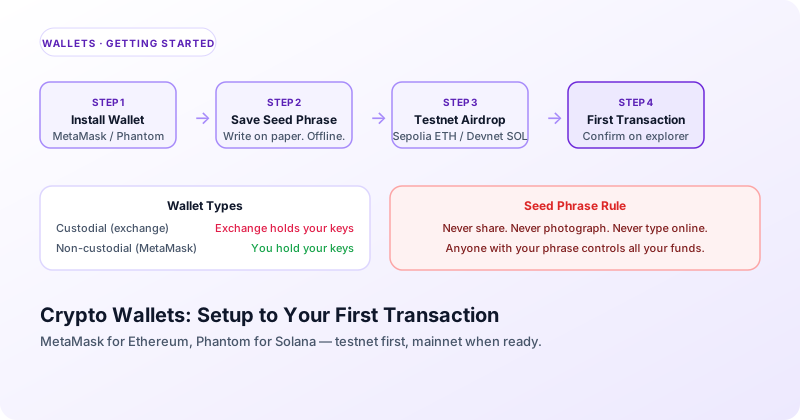
The 12 or 24 word seed phrase is a human readable encoding of your root private key. Anyone who has these words can generate every private key your wallet will ever produce and drain every address immediately. Write it down on paper. Store it in a physical safe or safety deposit box. Never type it into any website, app, or message. Never photograph it. Never store it in cloud storage. No legitimate service, application, or support person will ever ask you for it.
Section 02 · Types of Wallets
Custodial vs non-custodial, hot vs cold
Understanding these two dimensions tells you everything about the security model of any wallet.
The custodial vs non-custodial distinction is the more important of the two.
Custodial wallets
A custodial wallet is managed by a third party — typically an exchange like Coinbase, Binance, or Kraken. The exchange holds your private keys. You log in with a username and password, and the exchange signs transactions on your behalf. This is convenient but means you are trusting the exchange with your assets. If the exchange is hacked, goes bankrupt, or freezes withdrawals (as happened with FTX in 2022), you may lose access to your funds. Custodial wallets make sense for frequent trading but not for long term holding.
Non-custodial wallets
A non-custodial wallet gives you — and only you — control of your private keys. MetaMask, Phantom, and hardware wallets are non-custodial. No company can freeze your assets, no server outage can prevent you from transacting, and no bankruptcy takes your funds. The tradeoff is full responsibility: if you lose your seed phrase and your device, your funds are gone. The phrase 'not your keys, not your coins' refers to this distinction.
The hot vs cold distinction refers to internet connectivity.
Hot wallets
Hot wallets are connected to the internet. Browser extensions like MetaMask and Phantom are hot wallets. They are convenient for daily use and interacting with web applications, but they are exposed to online threats — malware, phishing sites, browser vulnerabilities. Hot wallets are appropriate for amounts you can afford to lose and for active use in applications.
Cold wallets
Cold wallets keep private keys on a device that is never connected to the internet. Hardware wallets — Ledger and Trezor are the most widely used — store keys in a secure chip and require physical button confirmation for every transaction. Even if your computer is compromised, the private key never leaves the hardware device. Cold storage is appropriate for significant holdings you do not need to access frequently.
Most serious crypto users use both. They keep a small working amount in a hot wallet for daily use and active DeFi, and store their long term holdings on a hardware wallet with a different seed phrase. This is the two wallet strategy: keep what you can afford to lose in the hot wallet, everything else on cold storage.
Section 03 · Wallet Options
MetaMask, Phantom, and what else is worth knowing
MetaMask — best for Ethereum and EVM chains
MetaMask is the most widely used non-custodial browser wallet. Consensys last published a user count of over 30 million monthly active users and has not updated it since, so treat any current figure you see quoted as an estimate. It supports Ethereum and every EVM compatible chain — Polygon, Arbitrum, Optimism, Base, BNB Chain, and hundreds of others. Adding a new network requires entering its RPC URL and Chain ID. MetaMask charges a 0.875 percent fee on in-wallet swaps. For basic transfers, there is no MetaMask fee — only the network gas fee. Via Snaps (MetaMask's extension system), it also supports Bitcoin and Solana.
Phantom — best for Solana and NFTs
Phantom is the primary wallet for the Solana ecosystem with over 15 million users. It was built specifically for Solana and its user experience — particularly for NFT management and token swaps — reflects that focus. Phantom now also supports Ethereum, Polygon, and Bitcoin, making it a viable option for users across multiple chains who prefer a single interface. Fees on Phantom swaps are lower than MetaMask on average, and the interface is consistently rated more beginner friendly.
Trust Wallet — mobile first multi-chain
Trust Wallet (owned by Binance but non-custodial) supports over 100 blockchains in a mobile focused interface. It is a good option for users who primarily interact with blockchain on their phone and want a single wallet for many chains. The trade off is that it is mobile focused — the browser extension experience is less polished than MetaMask.
Exodus — desktop multi-chain with exchange built in
Exodus is a desktop and mobile wallet with a clean interface and a built in exchange for swapping between assets. It supports over 300 cryptocurrencies across many chains. Exodus is particularly popular with users who are new to crypto and want a good looking interface with portfolio tracking built in. It is non-custodial. The swap fees are higher than dedicated exchange platforms.
Ledger and Trezor — hardware cold storage
For any significant holding, a hardware wallet is worth the $60 to $300 investment. Ledger and Trezor are the two established manufacturers. Both store private keys in a secure chip that never exposes the key to the connected computer, require physical confirmation for every transaction, and support hundreds of coins and tokens. Ledger experienced a data breach of customer personal information in 2020, though the device keys themselves were not compromised. Both have been independently audited.
Section 04 · MetaMask Setup
Installing MetaMask and getting Sepolia testnet ETH
This is the standard first step for anyone learning Ethereum development. Takes about 10 minutes.
Install the MetaMask extension
Go to metamask.io and click Download. Install the browser extension for Chrome, Firefox, or Brave. When prompted, click Create a new wallet — not Import a wallet. Set a strong password for local device access. This password protects the wallet on your device. It is separate from your seed phrase.
Save your seed phrase offline
MetaMask will show you a 12 word seed phrase. Write it down on paper. Do not take a screenshot, do not email it to yourself, do not store it in a notes app. This is the only backup of your keys. Click through the verification step where MetaMask asks you to confirm several words in the correct order — this confirms you have written it down.
Switch to Sepolia testnet
In MetaMask, click the network selector (it shows 'Ethereum Mainnet' by default). At the bottom of the list, click 'Show test networks' and select Sepolia. Your address is the same — MetaMask uses the same private key for both mainnet and testnet, but the balances are completely separate.
Request testnet ETH from a faucet
Visit the Alchemy Sepolia faucet at sepoliafaucet.com or the Infura faucet for Sepolia. Paste your MetaMask address (the 0x... string shown at the top of the extension), complete any verification step, and request the ETH. The faucet will send 0.1 to 0.5 test ETH to your address within a minute. You will see the balance appear in MetaMask once the transaction is confirmed.
Verify on Etherscan
Open Sepolia Etherscan at sepolia.etherscan.io and paste your address into the search bar. You will see your address page showing the incoming transaction from the faucet. This is what every Ethereum address looks like from the outside — anyone can look up any address. Your transaction history on a public blockchain is public.
Section 05 · Phantom Setup
Installing Phantom and getting Devnet SOL
Install Phantom
Go to phantom.app and install the browser extension for Chrome or Firefox. Create a new wallet when prompted. Set a password. Write down the 12 or 24 word seed phrase on paper and store it safely. Phantom's setup process is nearly identical to MetaMask — same principles apply.
Switch to Devnet
In Phantom, click the gear icon (Settings) then Developer Settings then Change Network. Select Devnet. The Devnet is Solana's developer testnet — it runs the same software as mainnet but uses tokens that have no real value. Your wallet address on Devnet is the same as on mainnet.
Airdrop Devnet SOL
With the Solana CLI installed (available at docs.solana.com/cli), run the command: solana airdrop 2. This requests 2 SOL on Devnet. Alternatively, visit the Solana Devnet faucet at faucet.solana.com, paste your Phantom address, and request tokens. You will see the balance update in Phantom within a few seconds.
Explore on Solscan
Visit solscan.io, switch the network selector to Devnet, and paste your address into the search bar. You will see your airdrop transaction. Solana transactions confirm in under a second — compare this to the 12 to 15 second wait on Ethereum. The transaction detail page shows the fee (typically less than 0.0001 SOL), the accounts involved, and the instructions executed.
Section 06 · First Transaction
Sending your first transaction on testnet
This is the most important practice step. Do it on testnet before ever moving real value.
The mechanics of sending a transaction are the same on mainnet and testnet. The only difference is the tokens have no real value on testnet. Practice here until the process feels routine.
Create a second wallet address
In MetaMask, click your account icon at the top right and select 'Add account or hardware wallet', then 'Add a new Ethereum account'. This creates a second address derived from the same seed phrase. This is your receiving address for the practice transaction. Copy it. In Phantom, click the three horizontal dots at the top of the wallet and select 'Add / Connect Wallet' then 'Create new wallet' for the same effect.
Send a test transaction from address one to address two
In MetaMask (on Sepolia), click Send. Paste your second address into the recipient field. Enter an amount — try 0.01 ETH. MetaMask will show you the estimated gas fee and the total cost. Click Next, review the details, and click Confirm. In Phantom on Devnet, the process is identical: click Send, paste the destination, enter 0.1 SOL, confirm.
Watch the transaction confirm
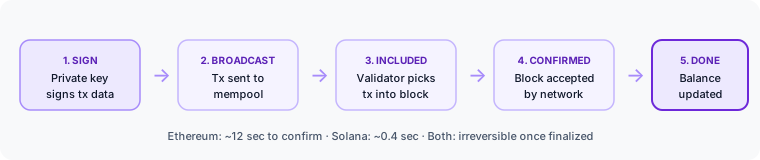
MetaMask will show a pending transaction in the activity tab. Ethereum transactions typically confirm within one to three blocks — about 12 to 36 seconds on Sepolia. In Phantom, Solana transactions confirm almost immediately. Click the transaction in the activity list to open it in the block explorer and see the full details: from address, to address, amount, gas used, block number.
Verify on the block explorer
Open Etherscan (Sepolia) or Solscan (Devnet) and paste the transaction hash. You will see the complete record: sender, recipient, value, gas fee, input data, block confirmation, and timestamp. This is the on-chain record that proves the transaction happened. Notice that both addresses in the transaction are publicly visible to anyone in the world. Blockchain transactions are not private by default.
Transactions are irreversible once confirmed
If you send a transaction to the wrong address, there is no way to reverse it. No customer support line, no dispute process, no undo button. The blockchain is immutable. Double check every address before confirming. Most wallets show the first and last few characters of an address — check both. For large amounts, send a small test transaction first and verify it arrived before sending the full amount.