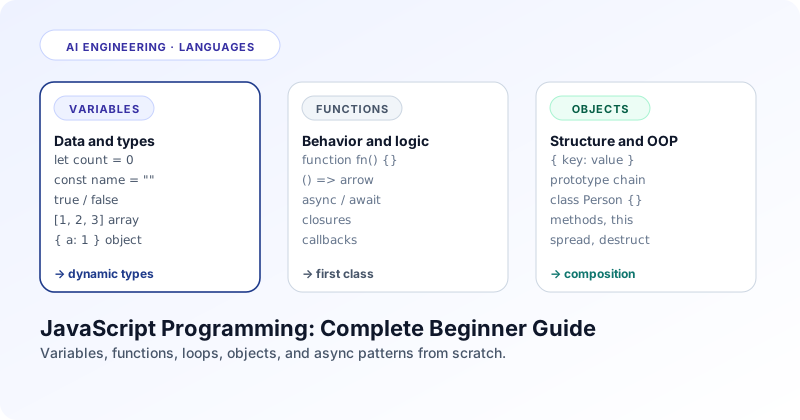
Section 01 · Definition
What is JavaScript, exactly?
JavaScript is the most widely deployed programming language on the planet. Knowing what it is and is not is the foundation everything else stands on.
Quick answer
What is JavaScript? JavaScript is a high level, dynamically typed, interpreted programming language designed in 1995 by Brendan Eich for the Netscape browser. It is now the universal scripting language of the web, the engine behind Node.js servers, the runtime of mobile apps written in React Native, and the language of choice for almost every modern AI integration on the client side.
The name causes confusion. JavaScript has nothing to do with Java. It was named that way for marketing reasons in the mid 1990s when Java was new and exciting. Internally, JavaScript belongs to the same family as Scheme and Self, two functional, prototype based languages. The language standard is owned by an organisation called Ecma International and the specification is officially called ECMAScript. New versions ship every year. ES2015 was the inflection point: it added the modern syntax most code is written in today.
JavaScript is dynamically typed. That means a variable can hold any kind of value, and the kind can change at runtime. The same variable can hold the number 42 in one line and the string "hello" in the next. The compiler does not stop you, but a wrong type at the wrong moment will crash your program. This is the trade off the language makes for flexibility, and it is the single reason TypeScript exists, which is JavaScript with an optional static type checker layered on top.
The language is interpreted, but modern engines do not actually interpret much of it. V8 in Chrome and Node.js, SpiderMonkey in Firefox, JavaScriptCore in Safari, all use a multi tier approach: parse the source, run the code through a fast baseline interpreter, then aggressively recompile hot functions to optimised machine code at runtime. From the developer's perspective JavaScript feels like an interpreted scripting language. Underneath, it is a just in time compiler running near the speed of native code.
JavaScript and TypeScript are not different languages
TypeScript is a superset of JavaScript. Every valid JavaScript file is a valid TypeScript file. TypeScript adds optional type annotations that are stripped away at build time, leaving plain JavaScript that runs in any browser or runtime. Most professional teams in 2026 write TypeScript and ship the compiled JavaScript output. If you learn JavaScript well, learning TypeScript is a few extra hours.
Section 02 · Use Cases
Why JavaScript exists and where it runs
JavaScript was created to make websites interactive. It became the only language that runs everywhere a developer wants to ship code.
JavaScript exists because in 1995 the web was static. HTML described pages and CSS styled them, but there was no way to react to a click without sending the user to a new page. Brendan Eich wrote the first version in ten days to add interactivity to Netscape Navigator. It worked. Within a few years every browser shipped a JavaScript engine, and the language became the default scripting layer of the web by accident of distribution rather than by careful design.
The interesting story is what happened after. Once V8 made JavaScript fast enough to be a server language, Ryan Dahl wrapped it in an event loop and called it Node.js. Suddenly the same engineer could write the front end and the back end in the same language. The npm package registry exploded into the largest software ecosystem in history. Then came React Native for mobile, Electron for desktop, Cloudflare Workers and Vercel Edge for serverless functions, and most recently the JavaScript SDKs for OpenAI, Anthropic, and every other AI provider. Today, if you can only learn one language and you want to ship something users can touch, JavaScript reaches the most surfaces.
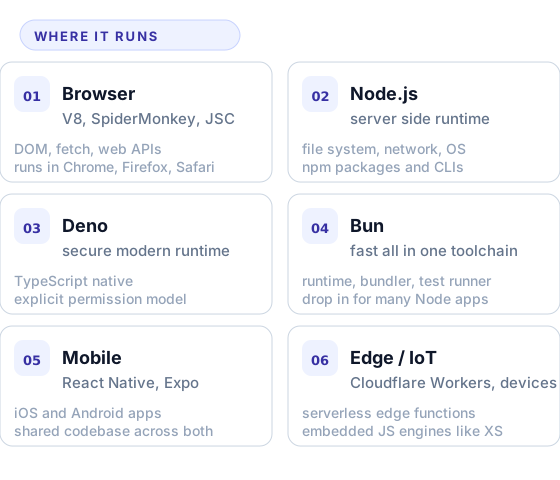
The use cases follow the platforms. Web applications and websites are the obvious one. Server side APIs and microservices written in Node, Deno, or Bun are the second. Cross platform mobile apps in React Native or Expo are the third. Desktop apps built with Electron or Tauri (Visual Studio Code, Slack, Discord, Figma) are the fourth. Build tools, CLIs, infrastructure scripts, AI agent runtimes, automated testing, browser extensions, browser based games, edge functions, even bits of embedded firmware on resource constrained chips. Almost no other language reaches that many places.
The point is not that JavaScript is the best language for any of these jobs individually. Rust is faster, Python has better data science libraries, Go is simpler for backend services. The point is that JavaScript is the only language that runs natively in every browser and is also a competent server language. That coverage is unique, and it is why an engineer who learns JavaScript well becomes immediately useful in almost every part of a modern stack.
Section 03 · Hello World
Your first JavaScript program
The fastest way to write JavaScript is to open a browser console. No installation, no project setup, no toolchain to configure.
Open Chrome, Firefox, or any modern browser. Right click on a page and pick Inspect. Switch to the Console tab. Type the following and press Enter:
const greeting = "Hello, world";
console.log(greeting.toUpperCase());
The console prints HELLO, WORLD. You just declared a constant, called a method on a string, and printed the result. Every JavaScript program is built from these same shapes. Variables hold values. Functions and methods transform them. Statements run top to bottom, except when an event handler or a promise schedules work for later.
Once browser console feels limiting, install Node.js from nodejs.org and create a file called hello.js:
function greet(name) {
  return `Hello, ${name}!`;
}

console.log(greet("Mudassir"));
// → Hello, Mudassir!
Run it with node hello.js. That is a complete JavaScript program. From here, you can read files, talk to APIs, spawn other processes, accept HTTP connections, and build anything from a CLI tool to a full web service. You will spend the rest of your time in JavaScript expanding on these primitives.
Section 04 · Variables
Variables and data types
JavaScript has seven primitive types and one big bucket called object. Knowing what each one is and how to declare them is the foundation of every line you write.
Modern JavaScript has three keywords for declaring variables. const creates a binding that cannot be reassigned. let creates a binding that can. var is the legacy keyword from the original language and almost no new code uses it. The rule of thumb is simple: default to const, switch to let only when you need reassignment, never reach for var.
const PI    = 3.14159;       // never reassigned
let count   = 0;             // will change
count       = count + 1;     // ok

const user  = { name: "Aya" };
user.name   = "Aya Khan";    // ok, the binding is const but the object is mutable
user        = { name: "x" }; // TypeError
A binding made with const cannot be reassigned, but it does not freeze the value it points to. A const object can still have its properties changed. To freeze the contents, use Object.freeze(). This is a small distinction that catches every beginner once.
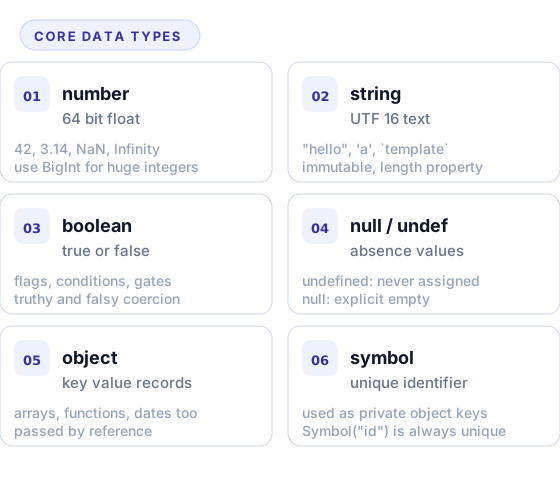
The numeric type is unusual. JavaScript has only one number type, a 64 bit float, which means integer arithmetic is exact only up to about 2 raised to the 53. Above that you need BigInt, which is a separate primitive added later in the spec. Strings are UTF 16, immutable, and can be written with single quotes, double quotes, or backticks. Backticks enable template literals, where you can interpolate values with the ${...} syntax.
The two absence values trip people up. undefined is what the runtime gives you when something has not been assigned: a missing function argument, a property that does not exist on an object, the return value of a function with no return statement. null is what you assign yourself to mean "explicitly empty". The convention in idiomatic code is that undefined comes from the language and null comes from your code. Most modern style guides nudge developers to use undefined consistently and avoid null entirely unless an external API forces it.
Everything that is not a primitive is an object. Arrays are objects. Functions are objects. Dates, regular expressions, maps, sets, promises, all of these are object subtypes. Two important consequences: objects are passed by reference, so two variables pointing at the same object see each other's changes; and equality (===) compares object identity, not contents. To compare contents you need a deep equal helper or to compare properties yourself.
Section 05 · Functions
Functions, scope, and closures
Functions are the core unit of JavaScript. There are four ways to define them and a few rules about scope that you must internalise to read any non trivial codebase.
A function takes inputs, optionally returns an output, and can have side effects (printing, writing files, calling APIs). JavaScript treats functions as values, which means you can pass a function as an argument, return it from another function, store it in a variable, or stick it into an array. This first class status is what lets the language feel functional even though it is multi paradigm.
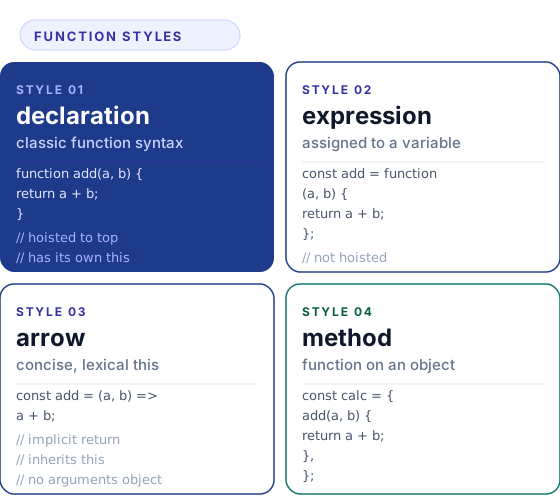
Function declarations (function fn() ) are hoisted, which means you can call them before the line of code that defines them. Function expressions and arrow functions are not hoisted; they exist only after the line that creates them. Arrow functions also do not have their own this; they inherit it from the enclosing scope. That single rule is why arrow functions became the default for callbacks and inline handlers.
Scope in JavaScript is lexical and mostly block scoped (with let and const). A variable declared inside a function or a curly brace block is invisible outside of it. A variable declared at the top level of a module is visible to everything in that module. Closures fall out of these rules naturally: when you return a function from inside another function, the returned function carries a live reference to its outer variables. That is the entire mechanism behind a huge amount of idiomatic JavaScript.
function makeCounter() {
  let count = 0;
  return () => ++count;
}

const next = makeCounter();
next(); // 1
next(); // 2
next(); // 3
The count variable lives inside makeCounter and is invisible everywhere else, but the returned arrow function still has access to it. Each call to makeCounter creates a fresh, private count. This is how libraries implement private state without classes, and it is the basis of patterns like the module pattern, partial application, and currying.
Section 06 · Control Flow
Conditionals, loops, and array methods
Branching and iteration in JavaScript work the way they do in any C family language. The interesting part is when to drop loops in favour of array methods.
Conditionals use the familiar if, else if, and else keywords. There is also a switch statement and a ternary expression (cond ? a : b) for short conditional expressions. JavaScript has the concept of truthy and falsy values: in a boolean context, the values false, 0, the empty string, null, undefined, and NaN are falsy. Everything else is truthy. This is unusual coming from typed languages and worth memorising.
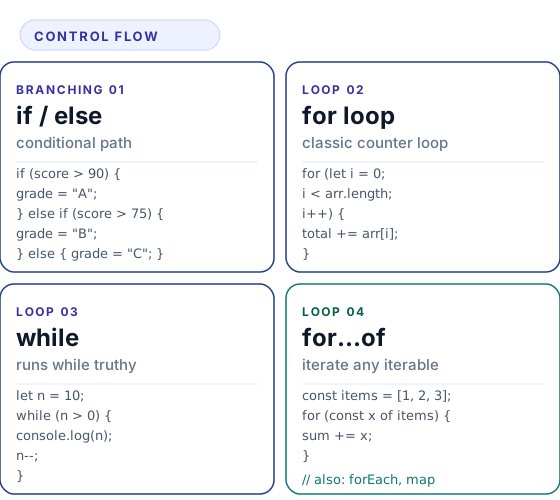
For iteration, JavaScript has the classic for loop, the while and do while loops, plus two newer iteration forms. for...of walks any iterable (arrays, strings, sets, maps, generators) and gives you the values. for...in walks the keys of an object but is rarely the right choice; prefer Object.keys() or Object.entries() with a for...of.
In production JavaScript, plain loops are surprisingly rare. Arrays come with a rich set of higher order methods that replace most of what loops used to do. Knowing these is the difference between writing JavaScript that looks dated and JavaScript that looks like 2026:
const numbers = [1, 2, 3, 4, 5];

const doubled = numbers.map(n => n * 2);
// [2, 4, 6, 8, 10]

const evens   = numbers.filter(n => n % 2 === 0);
// [2, 4]

const total   = numbers.reduce((sum, n) => sum + n, 0);
// 15

const found   = numbers.find(n => n > 3);
// 4
map transforms each item, filter selects items that match a condition, reduce collapses an array to a single value, find returns the first matching item, and some and every return booleans. They chain naturally because each one returns a new array. Use them when the work is a transformation; reach for a plain loop only when you need early exit, side effects, or careful control over performance on huge inputs.
Section 07 · Objects and Classes
Objects, arrays, and the prototype chain
JavaScript is a prototype based language wearing a class shaped costume since 2015. Knowing how the costume works keeps you out of trouble.
Objects in JavaScript are unordered collections of key value pairs. Keys are strings (or symbols). Values can be any type. You write them with literal syntax:
const user = {
  name: "Aya",
  age: 28,
  greet() {
    return `Hi, I am ${this.name}`;
  },
};

user.greet();         // "Hi, I am Aya"
user.email = "a@x";   // add a property at any time
delete user.age;      // remove a property
const { name } = user; // destructure into a variable
The destructuring syntax in the last line is one of the most used features in modern code. It also works on arrays (const [a, b] = list), function parameters, and nested structures. The spread operator ({...obj}, [...arr]) is its inverse and shows up everywhere you want to merge objects or copy arrays.
Underneath, every object has a prototype: a hidden link to another object. When you access a property that does not exist on the object, JavaScript walks up the prototype chain until it finds the property or reaches the end. This is how methods like Array.prototype.map are available on every array even though arrays do not store the method themselves. ES2015 added the class keyword as a more familiar syntax for setting up prototype chains:
class Person {
  constructor(name) {
    this.name = name;
  }

  greet() {
    return `Hi, I am ${this.name}`;
  }
}

class Engineer extends Person {
  constructor(name, stack) {
    super(name);
    this.stack = stack;
  }
}

const eng = new Engineer("Aya", "Node");
eng.greet();   // "Hi, I am Aya"
Classes give you constructors, methods, inheritance through extends, and the super keyword to call parent behaviour. Under the hood it is still prototypes; the syntax is the only thing that changed. In modern JavaScript, classes are most useful for stateful objects with multiple methods, like a database client or a game entity. For simple data containers, plain object literals are usually clearer.
Section 08 · Async
Asynchronous JavaScript: promises and async / await
The single most important thing JavaScript does differently from other languages is asynchrony. Once you understand it, the rest of the language clicks.
Quick answer
Why is JavaScript asynchronous? JavaScript runs on a single thread. To stay responsive while doing slow things like network calls or file reads, the language hands those tasks to the host environment, registers a continuation, and keeps running other code. When the slow task finishes, the continuation runs. Promises and async / await are the modern syntax for writing those continuations clearly.
The historical version of asynchronous JavaScript was callbacks. You passed a function as a final argument and the runtime called it when the work was done. Callbacks worked but composed badly, and stacking them produced the so called callback pyramid that made code hard to read and harder to debug.
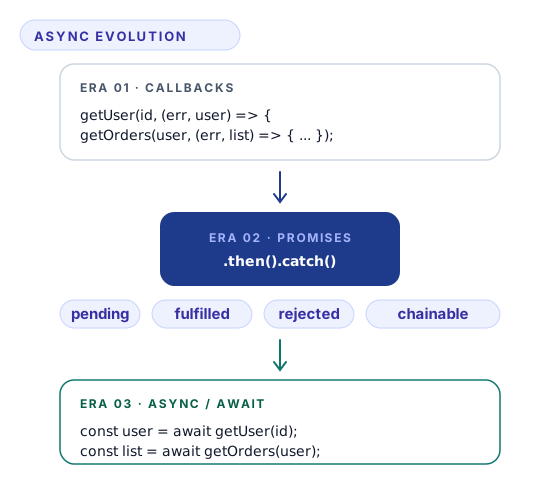
Promises replaced callbacks with a value oriented model. A promise represents the eventual result of an asynchronous operation. It starts in a pending state and ends in either fulfilled (with a value) or rejected (with an error). You attach handlers with .then() for success and .catch() for failure. Promises chain naturally because each .then() returns a new promise.
Then ES2017 added async and await, which is syntactic sugar over promises. An async function always returns a promise, and inside it you can use await to pause execution until a promise resolves. The result reads like ordinary synchronous code:
async function loadDashboard(userId) {
  try {
    const user   = await fetch(`/api/users/${userId}`).then(r => r.json());
    const orders = await fetch(`/api/orders?u=${userId}`).then(r => r.json());
    return { user, orders };
  } catch (err) {
    console.error("dashboard failed", err);
    return null;
  }
}

const data = await loadDashboard("u_42");
A few rules to internalise. await only works inside async functions and at the top level of modules. Awaiting a non promise value is a no op; the value comes back unchanged. To run independent async tasks in parallel, do not await them in sequence; collect them into an array and await Promise.all(). Use try / catch to handle errors. Forgetting to await a promise is one of the most common bugs in async code; many linters now flag it for you.
The event loop is the secret engine
Behind promises and timers and event handlers sits the event loop. JavaScript runs synchronous code on the call stack, sends async work to the host (browser or Node), and waits for completion callbacks to land in a queue. After every task finishes, the loop drains the queue. If you ever wonder why setTimeout with a 0 ms delay still runs after the current code, the event loop is the reason.