Section 01 · Definition
What an LLM Token Budget Actually Controls
Every LLM API call returns a usage object: prompt tokens consumed, completion tokens generated, total. A token budget is a rule that says what happens when that count, at a defined scope, exceeds a threshold.
The scope is where most implementations go wrong.
Quick answer
How do you set an LLM token budget? Define four scopes — request, workflow, tenant, and org — set a cap at each, and assign a breach response to each cap. Start with the request level, then instrument workflow level tracking in your orchestration layer. Tenant and org caps follow once you have consumption telemetry from the first two.
A token budget without a scope is just a spend alert. A scoped token budget is an enforcement mechanism. The difference is what fires when the threshold is crossed — and whether that response is appropriate for that scope.
Section 02 · Architecture
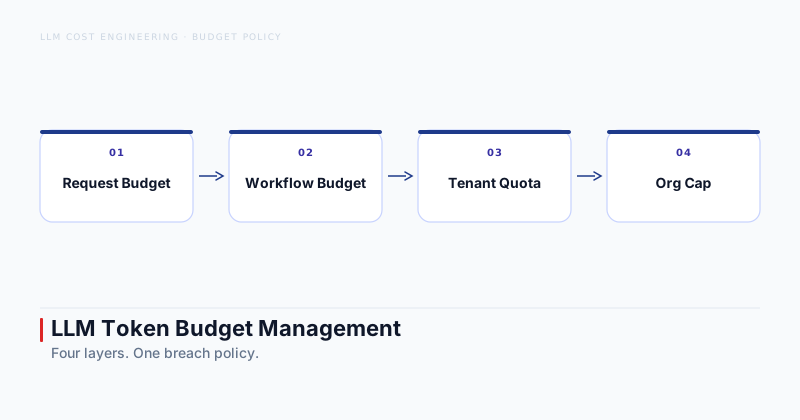
The Four Budget Layers Every Production System Needs
Treating the four layers as distinct is the structural insight most vendor cost dashboards skip. Here is what each one controls.
Request level — cap a single LLM call
The primary control is max_tokens in the API request. Set this at the call site, tightly, based on the expected output range for that specific step. A classification step that returns a label does not need the same completion budget as a reasoning step that generates a multi-paragraph analysis. Request level caps prevent one runaway call from consuming a disproportionate share of the workflow budget.
Workflow level — cap an end-to-end task
This caps cumulative token consumption across all LLM calls within a single agent task execution. An agent that plans, executes three tool calls, synthesizes results, and writes a final response makes four or more LLM calls. The workflow cap tracks their total. Without a workflow cap, a single stuck agent loop can exhaust tenant or org quotas before anyone notices.
Tenant level — cap per user or per organization
Tenant caps enforce fairness: one high volume tenant cannot starve others. They also enable tiered pricing — free tiers get a tighter quota, paid tiers get more. Tenant caps need grace period design: a user mid task should not hit a hard wall with no warning.
Org level — the global circuit breaker
This caps total token consumption across all tenants and workflows over a rolling window — daily or monthly, depending on your billing model. The org cap is the last line of defense against runaway cost. It should be set conservatively and monitored continuously, but it should not be the only budget layer.
Section 03 · Sizing
How to Size Each Budget Layer
The honest answer is: baseline first, then set caps. There is no universal number.
For request level caps, start by logging the actual completion length for each step type in your system. If your summarization step consistently produces outputs of 300 to 600 tokens, set the completion cap at 1,200. That gives the model room to vary while blocking runaway generation. Prompt tokens are harder to cap within a live call, so the primary lever is completion budgeting.
For workflow level caps, measure mean token consumption per completed task and the 90th percentile. Set the cap at twice the 90th percentile, then tighten it as you accumulate data. This leaves room for retries and edge cases without exposing yourself to unlimited consumption from a single task.
For tenant level caps, the starting point is your pricing model. Free tiers might cap at the 80th percentile of all tenant consumption. Paid tiers might cap at five to ten times that. Adjust based on actual usage patterns, not intuition.
Org level caps come from your monthly cost forecast. Set them at 120 percent of expected consumption to absorb volume spikes without a hard stop, then alert at 80 percent.
Section 04 · Breach policy
What Fires When a Budget Limit Is Hit
Setting a cap without defining the breach response produces either silent overspend or a hard failure at the worst possible moment. Four responses cover the full range from least to most disruptive.
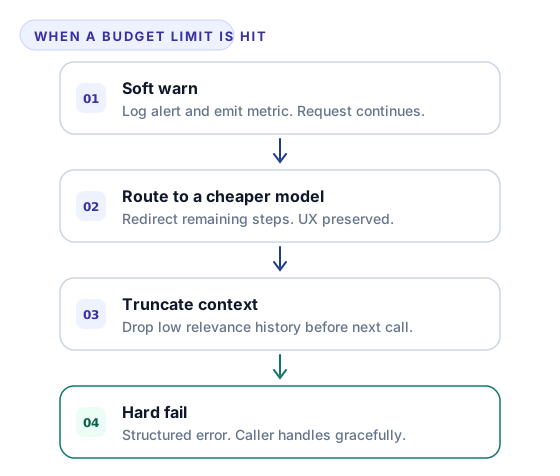
Soft warn — log and continue
Log the breach event, emit a metric, and continue the request. Use this for early warning thresholds — typically 70 to 80 percent of a cap rather than 100 percent. Soft warns give your on call team and your cost dashboard a signal before the situation is critical. They are not a control; they are telemetry.
Route to a cheaper model — preserve UX, cut cost
When a workflow level cap approaches its limit, redirect remaining steps to a lower-cost model. The task completes, UX is preserved, and the cost drops. This is the highest-leverage breach response for workflow and tenant caps.
Truncate context — drop low relevance history
Drop the least relevant portion of the context window before the next LLM call. For agent workflows with long conversation histories, most of the context after the first few steps is overhead. A context management layer can score relevance and trim to fit within the remaining budget.
Hard fail — structured error, stop the request
Return a structured error and stop the request. This is appropriate at the request level (to prevent one call from consuming an unbounded number of tokens) and at the org level (as the final circuit breaker). Hard fails must propagate gracefully — callers need to handle the error and surface a useful message rather than a generic server error.
See how to route requests to a cheaper model for the implementation details on the model rerouting path.
The key principle: choose the breach response per layer, not globally. Request level breaches usually warrant hard fails or request level context truncation. Workflow level breaches suit model rerouting or context trimming. Tenant level breaches suit soft warns with user facing notifications. Org level breaches suit hard fails with immediate alerting to engineering and finance.
Section 05 · Instrumentation
Tracking Token Consumption with Cost Telemetry
Enforcement without instrumentation is guesswork. Every provider returns usage metadata on each API response. This data must flow into your telemetry pipeline from day one.
The standard pattern: wrap each LLM call in an OpenTelemetry span, log llm.prompt_tokens, llm.completion_tokens, and llm.total_tokens as span attributes. Aggregate at the workflow level with a correlation ID that ties all calls in a task to the same budget counter. Tenant and org aggregations happen in a downstream metrics service or your observability platform.
Budget state — the remaining quota at each layer — should be maintained in a lightweight counter with an appropriate TTL. For request level enforcement, the counter is per call and lives in memory. For workflow level enforcement, the counter lives in a distributed cache keyed on the workflow execution ID. For tenant and org levels, a database backed counter with periodic reads and writes is appropriate; real time precision is less critical here, but the data must be durable.
Alert at 60 to 70 percent, not 95
An alert at 95 percent of a budget cap is nearly useless — there is not enough remaining budget to respond before the hard stop fires. An alert at 60 to 70 percent gives your team time to investigate unusual consumption patterns, reroute traffic, or extend a tenant quota deliberately. Set early warning thresholds at every layer.
Section 06 · Multi-agent systems
Token Attribution Across Agent Workflows
Single agent systems track token consumption per call. Systems that coordinate several specialized agents require shared budget context across the full graph.
The approach: the orchestrator initializes a budget context at task start, containing the workflow level cap and a remaining tokens counter. Each agent consumes from that counter as it makes LLM calls. The counter propagates as a parameter through agent to agent handoffs. Before each call, the agent checks whether the remaining budget is sufficient. If not, it applies the configured breach response — rerouting to a cheaper model or returning early with a partial result.
To measure cost per completed task at the system level, you need the workflow correlation ID to be consistent across all agents in the chain. Without that, attributing spend to specific workflows or task types is impossible from aggregated metrics alone.
One common design mistake: letting each agent maintain its own budget counter independently. This loses the global constraint and allows individual agents to each consume their full allocation, causing the workflow total to exceed the workflow cap.
Section 07 · Common mistakes
Common Token Budget Mistakes to Avoid
Each of these is recoverable once you know to look for it.
One global cap, zero layers. Setting a monthly org level cap and nothing below it is the most common gap. A runaway agent task can exhaust a significant portion of the monthly org budget before any alerting fires. Add request and workflow caps first — they are the fastest path to enforcement.
Retries counted outside the budget. A request that fails at the LLM layer and retries consumes tokens twice. If your retry logic lives outside the budget tracking layer, the budget counter does not see the retry. Count every API call, including retries, toward the relevant caps.
Uncapped context windows at the workflow level. Without a workflow level token cap, agent context windows grow with each step and are never bounded. This is the primary driver of token cost in agent systems — if you are still sizing the broader cost problem, the agentic AI cost optimization playbook covers the full leverage hierarchy.
No alerting before the hard cap. A hard fail at 100 percent of the org cap is a production incident. An alert at 70 percent is a planning conversation. Instrument early warning thresholds at every budget layer so surprises are rare.
Token budget policy is infrastructure, not a setting you configure once and forget. The four layer model — request, workflow, tenant, org — gives you precision at each scope. The breach responses — warn, reroute, truncate, hard fail — give you a calibrated range of options for the stakes and reversibility of each layer. If you are building production AI systems and want help designing the cost governance layer, AI Systems Architecture consulting covers this as part of the production readiness review.