Section 01 · The Problem
What a production vector database migration actually involves
A vector database migration is not a data dump and reload. At minimum, it touches three layers at the same time.
Quick answer
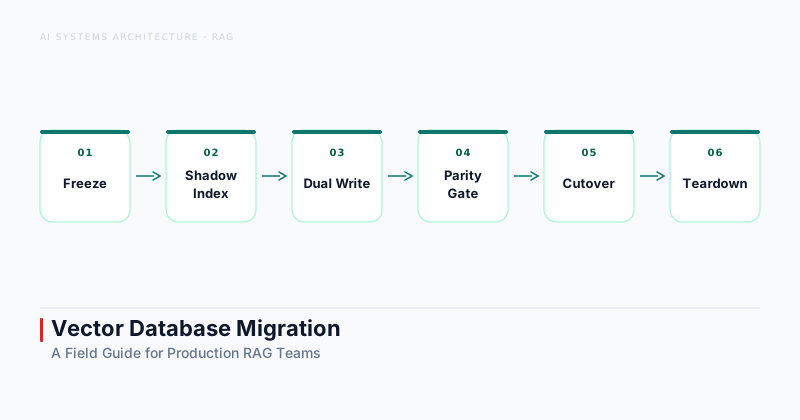
How do you migrate a vector database? Run a six phase sequence: freeze the schema, build a shadow index in the target database, enable dual write so both databases receive new embeddings, run shadow reads to compare recall@k, cut traffic to the new database once parity is confirmed, then decommission the old one. Never cut over without a recall drift budget defined in advance.
The three layers are the vector index (the structure that stores embeddings and their metadata), the embedding pipeline (the code that generates and writes vectors), and the retrieval logic (the queries, filters, and reranking steps that consume results). Modify any of these in isolation and the others drift out of sync.
The operational risk is asymmetric. A migration that goes wrong does not produce obvious errors. It produces quietly worse retrieval — recall drops, latency spikes, metadata filter mismatches that surface as model degradation rather than infrastructure failure. By the time the quality regression appears in user feedback or evaluation dashboards, you are already deep into production.
This asymmetry is why the six phase playbook exists. Each phase makes one layer change visible and independently reversible before you commit to the next. Reverting a dual write configuration is straightforward. Reverting a live traffic cutover at 2:00 AM is not.
Vector database migrations are also slower than engineers expect. A realistic timeline for a production RAG system with 10 to 50 million vectors is four to eight weeks from schema freeze to decommission. Teams that plan for a long weekend typically spend three weeks recovering from a premature cutover.
Section 02 · Decision Gate
When migration is worth the disruption
Three conditions justify a vector database migration. All three are threshold tests, not vague dissatisfactions.
| Condition | What it looks like | Minimum bar |
|---|---|---|
| Cost ceiling | Bill grows faster than retrieval quality improves at current volume | Sustained, documented trend — not a single month spike |
| Feature gap | Need hybrid search, filtered HNSW, or tenant-isolated namespaces the source cannot provide | Workaround cost exceeds migration cost over 12 months |
| Scale ceiling | Source hits throughput, latency, or consistency limits the vendor roadmap does not address | Observed, sustained limits under real load — not projected |
Vendor friction does not clear the bar. Bad API ergonomics, a rough support experience, aesthetic preference for another system's documentation — none of these justify a migration. The disruption cost is real: weeks of engineering time, a correctness risk window during dual write and shadow reads, and ongoing maintenance of two live databases during transition.
If you are not hitting one of the three thresholds, the answer is to stay on the current database and optimize the retrieval layer. The vector database comparison guide covers the feature differences worth tracking as your system scales.
Section 03 · Phases 1 and 2
Freeze schema and build the shadow index
The first two phases establish the stable baseline you will measure everything else against.
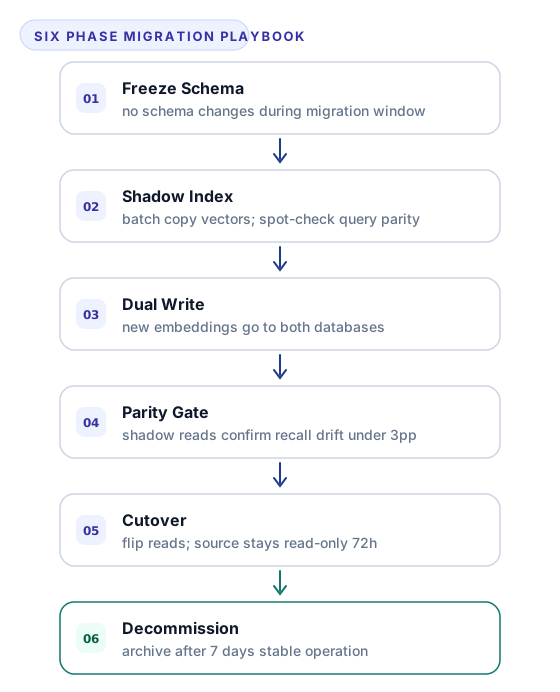
Phase 1 — Freeze schema. Before writing a single embedding to the target database, lock the source schema. No new metadata fields, no changes to embedding dimension, no alterations to normalization conventions while the migration is running. Schema drift during a migration is the second most common failure mode — it means the vectors you copied at the start do not match the vectors the pipeline is writing by the end.
A schema freeze runs one to two weeks in practice. Coordinate with every team that writes to the embedding pipeline or the data ingestion layer. If a planned schema change cannot wait, complete it in the source database first, rebuild the full source index after the change, then start the migration from the updated baseline. Starting from a moving target adds weeks.
Phase 2 — Shadow index. Build a complete copy of the existing vector collection in the target database using the current embeddings. Do not write new embeddings yet. The goal is a static copy that matches the source at a known point in time.
Use the source database's export API or a direct batch dump to pull embeddings and metadata. Write them to the target database with metadata fields matched exactly to the source schema — field names, types, and normalization must be identical. After the import completes, run a spot check: take 20 to 50 representative queries from your evaluation set, run them against both databases, and compare the result sets. If cosine similarity scores differ by more than one to two percent for identical vectors, the normalization or dimension handling differs between the two systems. Fix the discrepancy before proceeding.
The shadow index phase is also when you measure the throughput of the target database at your import batch size. If imports lag significantly, you have an opportunity to tune shard count, replica count, and batch size before dual write adds further pressure.
Section 04 · Phases 3 and 4
Dual write and shadow read parity
Dual write keeps the target current. Shadow reads tell you whether it is actually equivalent.
Phase 3 — Dual write. Enable asynchronous dual write: every new embedding the pipeline produces goes to both the source and the target database. The source database remains authoritative; writes to the target are fire and forget with error logging and dead letter queuing. This phase keeps the target current with new data while you validate it against production traffic patterns.
Dual write has a cost. Every document now pays two indexing operations. At low to medium ingest rates this is acceptable. At high ingest rates, budget for the added write latency and monitor queue depth on the target side. Write lag that accumulates during this phase creates a gap between what the target serves and what the source serves — a gap that shadow read results will measure as a quality difference rather than an infrastructure lag.
Phase 4 — Shadow read parity check. Route a small fraction of production read traffic — typically five to ten percent — to the target database in shadow mode. The user receives the source database result; the shadow result is logged and compared offline.
Run shadow reads for long enough to cover your full query distribution. For systems with daily and weekly query patterns, 48 to 96 hours is usually sufficient. Compare recall@10 across the shadow result set against the source. A drop of more than three percentage points is a rollback signal — investigate metadata filter mismatches, normalization differences, or index build quality before continuing.
Shadow reads also surface latency differences that do not appear under synthetic load. The target database may handle benchmark queries well but degrade at tail latency under the real query mix. Measure p99 latency during the shadow read period, not just p50.
The RAG evaluation metrics guide covers the full recall and latency measurement toolkit if your team needs to build the shadow read comparison pipeline from scratch.
Section 05 · Phases 5 and 6
Cutover and decommission
Cutover is the highest-stakes moment. The decommission gate keeps it reversible until you are certain.
Phase 5 — Cutover. Shift 100 percent of read traffic to the target database. Keep the source database running in read only mode for at least 72 hours after cutover. This preserves the rollback option if a latency spike or quality regression surfaces that shadow reads did not catch.
Monitor p99 query latency and the result set overlap rate between source and target during the first 24 hours after cutover. If p99 latency exceeds 20 percent above the baseline measured before the migration, or result overlap drops below 90 percent on your evaluation queries, roll back immediately and investigate before retrying. The rollback procedure — flip the routing layer back to the source database — should be documented and tested before cutover day. A rollback that requires a code deployment under pressure is not a rollback; it is a recovery incident.
Do not schedule cutover on a Friday. Do not schedule it the day before a product launch. The first 24 hours after cutover are the riskiest window, and you need experienced engineers available to respond.
Phase 6 — Decommission. After seven or more days of stable production operation on the target database, the rollback window closes. Stop writes to the source database, archive or delete the collection according to your data retention policy, and remove the dual write logic from the embedding pipeline.
Decommission requires a human decision, not an automated trigger. A senior engineer or tech lead signs off that quality metrics are stable, no regressions have surfaced in the monitoring window, and the rollback period is formally closed. This gate exists because silent retrieval regressions can take days to surface in user facing metrics. The pipeline will not tell you when to decommission — the engineering team has to decide.
Section 06 · Re-Embedding Decision
Do you need to reembed?
This question determines whether Phase 2 takes hours or days. The answer depends on three factors.
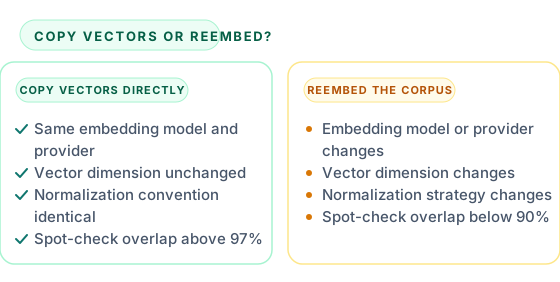
Embedding model. If you use the same model and the same API provider in both databases, the embeddings are identical. Copy vectors directly; no reembedding required. If you change the model — moving to a different provider or a different model version that produces a different vector space — every vector must be regenerated. The vector space of one model is not semantically compatible with the vector space of another.
Dimension. If the embedding dimension changes, copying vectors is not possible. A 1,536-dimension vector cannot be inserted into an index configured for 3,072 dimensions, and even if the index accepted it, the similarity scores would be meaningless.
Normalization. Some databases store L2-normalized vectors by default; others store raw vectors and normalize at query time. If the source and target differ in normalization behavior, a vector that was normalized on write in the source will produce incorrect cosine similarity scores in the target unless you account for the normalization state during import.
The compatibility test before committing to a full copy: take 100 vectors from the source database, import them to the target using the same metadata schema, run 10 representative queries, and compare result set overlap. If overlap exceeds 97 percent, the vector space is compatible and you can copy the full corpus without reembedding. If overlap is below 90 percent, investigate whether the gap comes from normalization, dimension handling, or metric type before deciding.
Teams that discover at Phase 2 that they need to reembed should factor the reembedding cost into the migration timeline. For a corpus of 10 million documents at a typical batch rate, reembedding can add two to three weeks to the schedule. Plan for it; do not discover it partway through the migration.
Section 07 · Quality Gates
Correctness gates — recall drift, latency, and cost checkpoint
Three gates must clear before cutover proceeds. Define all three before the migration starts, not after you see the numbers.
Recall@k drift budget. Establish a baseline recall@10 score on a fixed evaluation set of 200 to 500 queries before the migration begins. During shadow reads in Phase 4, measure recall@10 against the same set using target database results. A drift of three percentage points or more is a hard rollback trigger. If your baseline recall@10 is 0.74 and the shadow result is 0.70, that is a four point drop — stop and investigate. Setting the threshold retroactively after you see a five point drop and deciding five points is acceptable is how teams ship quality regressions.
Latency SLO. Measure p50 and p99 query latency on the source database under normal production load before the migration starts. The target database must stay within 20 percent of these baselines under the same load profile during shadow read validation. If the target consistently runs slower, investigate index build parameters — HNSW ef_construction settings, shard count, replica count — before committing to cutover.
Cost checkpoint. During dual write, your infrastructure costs are temporarily doubled. Before cutover, model the cost per query on the target database after migration and confirm it meets the economics that justified the migration. A move to a self hosted vector database for cost reasons that lands with underprovisioned hardware can end up more expensive than the managed service it replaced.
If any of the three gates fail, the migration pauses. The correct response is to identify and fix the root cause, then rerun the validation phase. Lowering the threshold to clear the gate is not a resolution — it is a deferred incident.
If your team builds production RAG systems and needs architectural guidance on migration strategy or vector infrastructure design, the AI Systems Architecture service covers this as part of a broader engagement.