Solana Transactions Explained: Structure, Fees, Lifecycle
By Mudassir Khan — Agentic AI Consultant & AI Systems Architect, Islamabad, Pakistan

Quick answer
What is a Solana transaction? A Solana transaction is an atomic packet that bundles one or more instructions, a list of account addresses, and a recent blockhash into a single unit. Either all instructions succeed and state is committed, or the transaction fails and nothing changes on chain.
Section 01 · Structure
What a Solana transaction contains
A transaction is a compact binary message with four logical parts: a header, an account key list, a recent blockhash, and an instruction list.
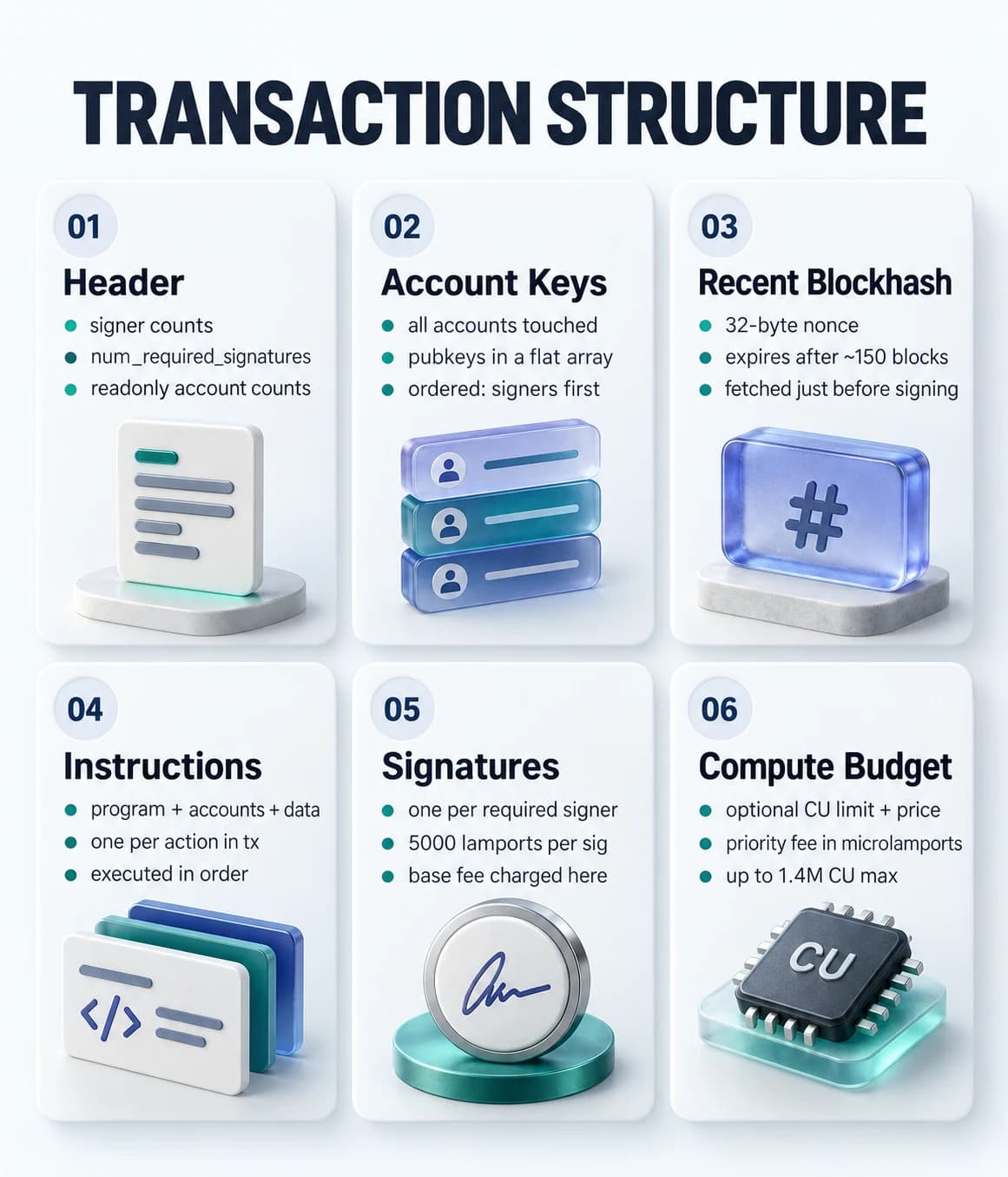
The header is three bytes that tell the runtime how many signers the transaction has and how many of those are read only. This lets the runtime set up account locks before processing begins. The account keys array follows — every public key that any instruction in the transaction touches, listed in order with signers first.
The recent blockhash is a 32-byte hash of a recent block that acts as a nonce. The network rejects any transaction referencing a blockhash older than roughly 150 blocks. That window is about 60 seconds. If you take too long between fetching the blockhash and sending the transaction, it will be rejected as expired.
Instructions are the payload. Each instruction references a program by index into the account keys array, lists which accounts it touches (again by index), and carries raw instruction data bytes that the program decodes. A single transaction can hold multiple instructions from different programs, and they execute in order.
Read Solana Accounts Explained if you need a deeper look at how accounts work before going further with transactions.
Section 02 · Instructions
Instructions: the atomic unit of work
A transaction is a container. Instructions are what actually run.
Each instruction has three parts: a program_id_index pointing into the account keys array, an accounts list of indices for the accounts that instruction reads or writes, and a data field of raw bytes.
On the client side you express this with AccountMeta objects: { pubkey, isSigner, isWritable }. The isWritable flag matters for parallel execution — the runtime can run two transactions concurrently if none of their writable accounts overlap.
One transaction, multiple programs
A single transaction can call SystemProgram.transfer and your custom program in sequence. Both instructions share the same account keys list and the same atomic commit. If the second instruction fails, the first one's state change is also rolled back.
Section 03 · Fees
Transaction fees and priority fees
Solana fees are predictable and cheap. There are two layers: a fixed base fee and an optional priority fee.
The base fee is 5000 lamports per signature. One signature on a simple transfer is 0.000005 SOL — about $0.00025 at a $50 SOL price. A transaction with three required signers costs 15,000 lamports. The base fee is burned, not given to validators.
Priority fees are different. You set them with two ComputeBudgetProgram instructions prepended to your transaction: setComputeUnitLimit declares how many compute units your transaction will use, and setComputeUnitPrice sets the price per CU in microlamports. The total priority fee is units × microlamports. At 100,000 CUs and 1,000 microlamports per CU, you pay 0.0001 SOL extra to get ahead of the default queue.
Setting a CU limit too low
If your transaction exceeds the compute unit limit you declared, the runtime aborts it and you still pay the base fee. Always estimate CU usage generously, or benchmark on devnet first. The default of 200,000 CUs is fine for simple transfers but too low for complex programs.
Section 04 · Lifecycle
From submission to finality
A Solana transaction goes through five stages between your sendTransaction call and final confirmation.
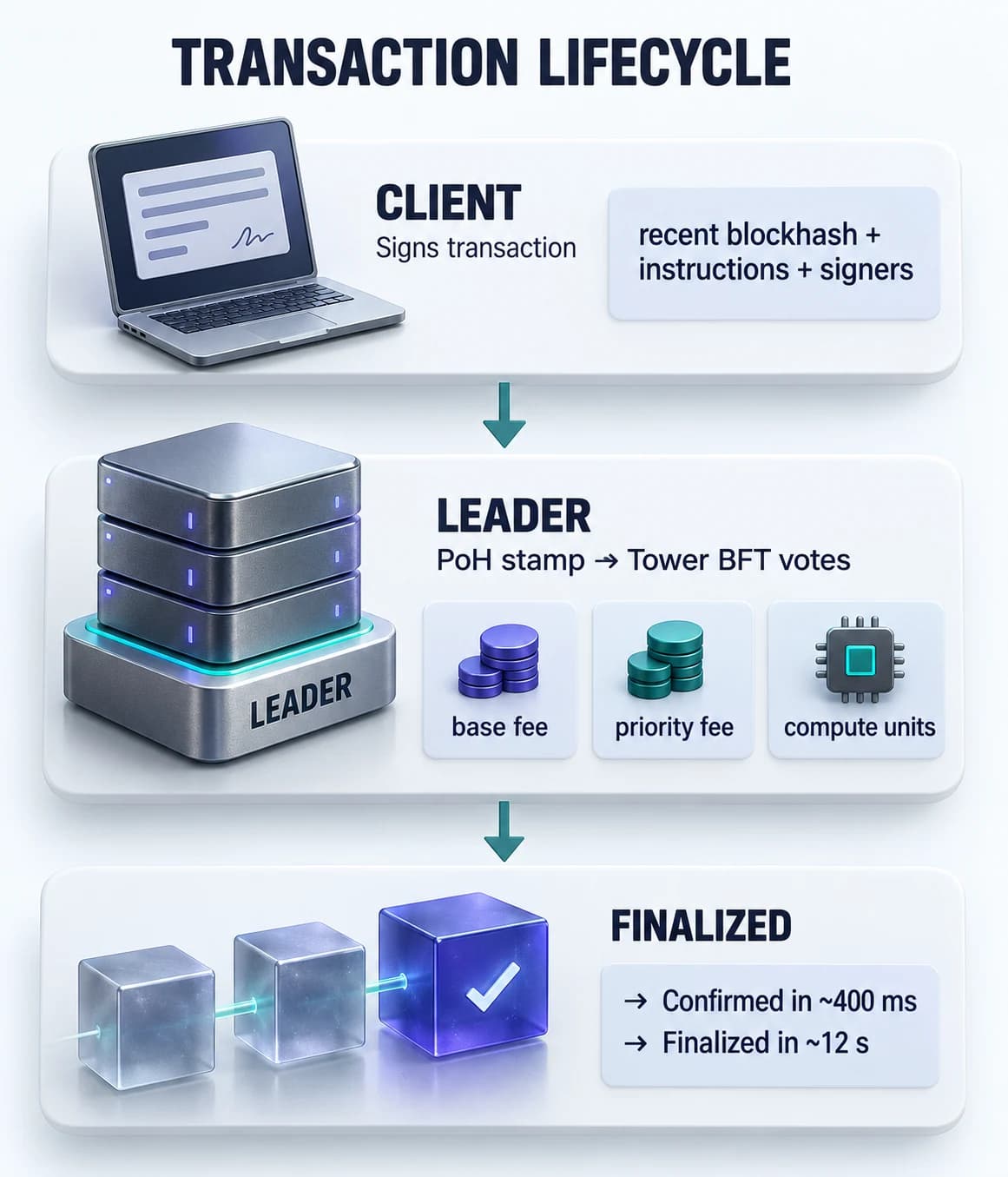
Client signs and sends
You fetch the latest blockhash, add it to the transaction, sign with all required keypairs, and call sendTransaction. The SDK serializes the transaction to binary and sends it to an RPC node.
RPC forwards to leader
The RPC node forwards the transaction to the current leader — the validator whose turn it is to produce a block. Leaders rotate every 4 slots (~1.6 seconds). If the leader's queue is full, the transaction waits or is dropped.
Leader stamps with Proof of History
The leader includes the transaction in a block and stamps it with a Proof of History sequence number. This sequence is a cryptographic clock that proves the order of events without requiring validators to communicate first.
Tower BFT accumulates votes
Validators vote on the block. When 2/3 of stake has voted, the transaction is confirmed. This typically takes under 400 milliseconds. At this point the transaction is safe for most applications — the probability of rollback is negligible.
Maximum lockout: finalized
After enough vote lockout rounds, the block reaches the finalized state. This takes roughly 12 seconds. A finalized block cannot be rolled back under any circumstances — it is the strongest guarantee Solana offers.
To understand what Proof of History actually does, read Proof of History Explained. For hands on code that sends real transactions, the Solana Hello World with Anchor guide walks you through your first program end to end.
Section 05 · Code
Building and sending a transaction in TypeScript
Here is what a real transfer looks like, followed by how to attach a priority fee.
import {
  Connection,
  Keypair,
  PublicKey,
  SystemProgram,
  Transaction,
  sendAndConfirmTransaction,
} from "@solana/web3.js";

async function transferSol() {
  const connection = new Connection(
    "https://api.devnet.solana.com",
    "confirmed"
  );

  // In production: load from file, not generate()
  const sender = Keypair.generate();
  const recipient = new PublicKey("RecipientAddressHere11111111111111111111");

  const transaction = new Transaction().add(
    SystemProgram.transfer({
      fromPubkey: sender.publicKey,
      toPubkey: recipient,
      lamports: 1_000_000, // 0.001 SOL
    })
  );

  const signature = await sendAndConfirmTransaction(
    connection,
    transaction,
    [sender] // signers
  );

  console.log("Signature:", signature);
}import { ComputeBudgetProgram, Transaction } from "@solana/web3.js";
// Adding a priority fee to jump ahead in the queue
const transaction = new Transaction().add(
// Set how many compute units this transaction will use
ComputeBudgetProgram.setComputeUnitLimit({ units: 100_000 }),
// Set the price per compute unit (microlamports)
ComputeBudgetProgram.setComputeUnitPrice({ microLamports: 1_000 }),
// Your actual instruction follows
SystemProgram.transfer({
fromPubkey: sender.publicKey,
toPubkey: recipient,
lamports: 500_000,
})
);
// Total priority fee = 100,000 CU x 1,000 microlamports = 100,000,000 microlamports = 0.0001 SOLIf you are building on Solana for production and need help with program architecture, transaction batching, or fee optimization, the blockchain development service covers the full stack from devnet to mainnet deployment.
FAQ
Frequently asked questions
What is a Solana transaction?
A Solana transaction is an atomic packet that bundles one or more instructions together and submits them to the network as a single unit. Either all instructions succeed and the state changes are committed, or the transaction fails and nothing changes. Every transaction includes a recent blockhash as a nonce to prevent replay attacks, a list of all account addresses it will read from or write to, and one or more cryptographic signatures from required signers.
How much does a Solana transaction cost?
The base fee for a Solana transaction is 5000 lamports per signature, which at typical SOL prices works out to roughly $0.00025. Transactions with multiple signatures pay 5000 lamports per additional signer. Developers can also add a priority fee — a price per compute unit expressed in microlamports — to increase the likelihood that their transaction gets included in the next block during periods of high demand. A simple transfer with one signature typically costs well under $0.001.
What is a compute unit in Solana?
A compute unit (CU) is the measure of computational work that a transaction consumes on the Solana runtime. Every instruction execution, account access, and cryptographic operation costs a certain number of compute units. Each transaction has a default budget of 200,000 CUs, with a maximum of 1.4 million CUs. Developers can request a custom limit with ComputeBudgetProgram.setComputeUnitLimit and pay a priority fee per CU with setComputeUnitPrice to speed up inclusion during congestion.
What is a recent blockhash in a Solana transaction?
A recent blockhash is a 32-byte hash included in every Solana transaction that serves as a nonce — a one-time value that prevents transaction replay. The network only accepts transactions referencing a blockhash from one of the last ~150 blocks, which is roughly 60 seconds of history. After that window, the transaction is rejected as expired. This design ensures that a transaction cannot be intercepted and re-submitted indefinitely. Clients fetch the latest blockhash using connection.getLatestBlockhash() just before signing.
What is transaction finality in Solana?
Solana has three confirmation levels. Processed means the transaction landed in a block on at least one validator but has not yet been confirmed by the broader network. Confirmed means two-thirds of validators have voted for the block containing the transaction, which typically takes under one second. Finalized means the block has reached maximum lockout, meaning it cannot be rolled back — this takes roughly 12 seconds. Most applications use confirmed as their commitment level, which provides strong safety guarantees fast enough for real time user interactions.
Written by Mudassir Khan
Agentic AI and blockchain engineer based in Islamabad, Pakistan. CEO of Cube A Cloud (US), Senior DevOps Engineer at Echonos AI, and a Web3 trainer with seven years at PIAIC.
View Blockchain Development service →See Build My Dapp Web3 Delivery case study →
Solana Accounts Explained: What Every Developer Must Know
In Solana, everything is an account. Learn how accounts store data, who owns them, how rent keeps them alive, and how programs interact with them.
Solana Hello World with Anchor: First Program Guide
Build your first Solana program with Anchor. This step by step guide covers setup, writing the program, testing locally, and deploying to devnet.
Building a smart contract or dapp?
Book a free 30 minute call. I will review your contract or architecture and tell you honestly what it needs before mainnet.